Register for your free account! | Forgot your password?

Go Back   elitepvpers > Popular Games > Silkroad Online > SRO Coding Corner
You last visited: Today at 11:30

  • Please register to post and access all features, it's quick, easy and FREE!

Advertisement


[PK2 TOOL] BMS Model converter

Discussion on [PK2 TOOL] BMS Model converter within the SRO Coding Corner forum part of the Silkroad Online category.

Reply
 
Old 01/17/2013, 12:47   #241
 
perrytje's Avatar
 
elite*gold: 0
Join Date: Feb 2008
Posts: 226
Received Thanks: 531
Quote:
Originally Posted by yurka333 View Post
perrytje, that's was not my problem, I just quoted ichbinhierneu's post xD
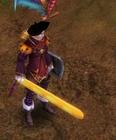
Nezekan, well, its just a bit bigger then in anime, but that not problem, cause it still look cool xD
Have to agree with Nezekan, it's way too big, looks wrong
perrytje is offline  
Thanks
1 User
Old 01/17/2013, 13:44   #242
 
yurka333's Avatar
 
elite*gold: 50
Join Date: Nov 2007
Posts: 183
Received Thanks: 54
On this screen its better, i think
yurka333 is offline  
Old 01/21/2013, 01:15   #243
 
elite*gold: 0
Join Date: Jan 2012
Posts: 72
Received Thanks: 0
Game crashes

i have narrowed down the reason to why it is crash by doing the following:

i have extracted tblade_01 from original Sro then i converted it to .obj and then i selected it and went to export as .obj and used selection only, include normals, include UV, i don't have high quality normals as a setting in blender. anyway i export it and then i import it again it still the way i left it. i convert it to .bms and then back to.obj and open it but the object isn't even there. i zoom all the way out and i don't see it. the little yellow rectangle in the middle that defines the center of the object is there but no edges, no vertices , no faces. i don't know what to do please help
gman2233 is offline  
Old 01/21/2013, 09:11   #244
 
perrytje's Avatar
 
elite*gold: 0
Join Date: Feb 2008
Posts: 226
Received Thanks: 531
Are you trying with the updated converter? The one with US-support?
perrytje is offline  
Thanks
1 User
Old 01/23/2013, 22:40   #245
 
elite*gold: 0
Join Date: Jan 2012
Posts: 72
Received Thanks: 0
that was the reason

thank you
gman2233 is offline  
Old 01/25/2013, 17:25   #246
 
yurka333's Avatar
 
elite*gold: 50
Join Date: Nov 2007
Posts: 183
Received Thanks: 54
well, just was bored xD
hairs stolen from one game xD
yurka333 is offline  
Old 02/02/2013, 00:30   #247
 
serribaba's Avatar
 
elite*gold: 0
Join Date: Jan 2009
Posts: 27
Received Thanks: 5
There is a problem about srobj check this out

Before export srobj rigged model ;
(this is scorpion leg)


It is rotating after export the model.


( im importing after export and its rotate )


it could be a bug ? please re-answer.
Attached Files
File Type: zip Bug.zip (67.0 KB, 30 views)
serribaba is offline  
Old 02/02/2013, 10:44   #248
 
yurka333's Avatar
 
elite*gold: 50
Join Date: Nov 2007
Posts: 183
Received Thanks: 54
seems like u rotated it in Object Mode, u should rotate it in Edit Mode
yurka333 is offline  
Old 02/02/2013, 11:09   #249
 
serribaba's Avatar
 
elite*gold: 0
Join Date: Jan 2009
Posts: 27
Received Thanks: 5
Quote:
Originally Posted by yurka333 View Post
seems like u rotated it in Object Mode, u should rotate it in Edit Mode
No no its not like this, im not rotating. Its rotating automaticly after export srobj ? Can you check attached file, open and export srobj and import again look what happend
serribaba is offline  
Old 02/02/2013, 15:31   #250
 
perrytje's Avatar
 
elite*gold: 0
Join Date: Feb 2008
Posts: 226
Received Thanks: 531
Firstly, thanks for attaching the zip right away, made things a lot faster.

Secondly, yurka is right here. Select the model in object mode and do Object > Clear > rotation, you will see it rotates to how it looks after the conversion.

Try converting a fresh pair of scorpion legs from the files and see if it's also rotated like this, if it is my converter indeed has a bug. If they are not rotated (nothing happens when you clear the rotation) go into edit mode on your edited object and rotate it to how the original is rotated.
perrytje is offline  
Old 02/02/2013, 21:09   #251
 
yurka333's Avatar
 
elite*gold: 50
Join Date: Nov 2007
Posts: 183
Received Thanks: 54
silkroad is perfect now haha xD


--------------------------------
OH, that what i wanted to make for long time
yurka333 is offline  
Old 02/03/2013, 00:01   #252
 
serribaba's Avatar
 
elite*gold: 0
Join Date: Jan 2009
Posts: 27
Received Thanks: 5
Quote:
Originally Posted by perrytje View Post
Firstly, thanks for attaching the zip right away, made things a lot faster.

Secondly, yurka is right here. Select the model in object mode and do Object > Clear > rotation, you will see it rotates to how it looks after the conversion.

Try converting a fresh pair of scorpion legs from the files and see if it's also rotated like this, if it is my converter indeed has a bug. If they are not rotated (nothing happens when you clear the rotation) go into edit mode on your edited object and rotate it to how the original is rotated.
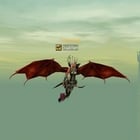
Thank you for answer, finally i did. ( Sandking from dota )


serribaba is offline  
Old 02/03/2013, 00:03   #253
 
yurka333's Avatar
 
elite*gold: 50
Join Date: Nov 2007
Posts: 183
Received Thanks: 54
Quote:
Originally Posted by serribaba View Post
Thank you for answer, finally i did. ( Sandking from dota )

http://c1302.hizliresim.com/16/3/jpu2y.jpg[/IMG]

[URL=http://c1302.hizliresim.com/16/3/jpu3q.jpg[/IMG]
It have animation too?
yurka333 is offline  
Old 02/03/2013, 19:56   #254
 
serribaba's Avatar
 
elite*gold: 0
Join Date: Jan 2009
Posts: 27
Received Thanks: 5
Quote:
Originally Posted by yurka333 View Post
It have animation too?
Yes.
-------------------------------------------------------

Hey
@perrytje

Nice another problem again, sorry for all this boring questions but i must learn what provides that.


Thats my new project and UV Map is look okay as you seen like.

Before i export the model with srobj extension ( There is no problem vertex groups tested game and have no bug ) there is no bug, everythings is okay

But after export the .srobj, i imported this file again at blender and look what happend;


UV Map blowed up and its looking weird at gameplay, please reply again and im so sorry about another boring question.
serribaba is offline  
Old 02/03/2013, 20:45   #255
 
perrytje's Avatar
 
elite*gold: 0
Join Date: Feb 2008
Posts: 226
Received Thanks: 531
No idea what's going on here tbh.
perrytje is offline  
Reply

Tags
bms, model, obj, pk2, tool


Similar Threads Similar Threads
[Tool] EDF converter
12/11/2012 - RFO Hacks, Bots, Cheats, Exploits & Guides - 26 Replies
Here is the Item edf Converter. I looked on the site to find it and still couldn't find it. After about 3 hours of looking (google didnt even show up with it lol) I found it and thought i would post it here for you guys to use. BTW im not A leecher If i PM you I Just lost the PW to the email on my other account and the account password look it up name is Dro in member list. ********* Edit *********
[TooL] AgBot Script Converter
09/08/2012 - SRO Hacks, Bots, Cheats & Exploits - 34 Replies
Hey E*PvP members. Here is a litle tool me and hussert ware working on. AgBot Script Converter Current Version 1.00 Screenshot: http://img126.imageshack.us/img126/7180/logonp1.pn g Functions:
SIlkroad Model Converter + View Sample [C#]
11/26/2010 - SRO Coding Corner - 13 Replies
I am finished with my C# BMS Converter: class BMSConverter { int charCount; int vertCount; int boneCount; int faceCount; string mtlLib; string meshGroup;
[Tool] Model Changer
08/06/2009 - SRO Hacks, Bots, Cheats & Exploits - 3 Replies
....
[TOOL] dxtbmpx -dds converter
03/26/2009 - CO2 Private Server - 0 Replies
dxtbmp I found a tool for converting dds files in normal grafic files and back. But i donīt know if this here is the right forum part How to use it? I.install the programm II. open the programm Converting dds to bmp III. press "File" and then "open" and chose the dds file that you want to convert


All times are GMT +1. The time now is 11:35.


Powered by vBulletin®
Copyright ©2000 - 2025, Jelsoft Enterprises Ltd.
SEO by vBSEO ©2011, Crawlability, Inc.
This site is protected by reCAPTCHA and the Google Privacy Policy and Terms of Service apply.

Support | Contact Us | FAQ | Advertising | Privacy Policy | Terms of Service | Abuse
Copyright ©2025 elitepvpers All Rights Reserved.