Register for your free account! | Forgot your password?

Go Back   elitepvpers > Popular Games > Silkroad Online > SRO Coding Corner
You last visited: Today at 05:52

  • Please register to post and access all features, it's quick, easy and FREE!

Advertisement


[PK2 TOOL] BMS Model converter

Discussion on [PK2 TOOL] BMS Model converter within the SRO Coding Corner forum part of the Silkroad Online category.

Reply
 
Old 11/12/2013, 18:35   #391
 
elite*gold: 0
Join Date: Nov 2013
Posts: 168
Received Thanks: 117
awesome
Skullsoil is offline  
Old 11/23/2013, 21:23   #392
 
ramadan_Mohamed205's Avatar
 
elite*gold: 0
Join Date: Jan 2013
Posts: 5
Received Thanks: 2
I have a problem
it weapon Hidden i need any one hellp me for this broplem


ramadan_Mohamed205 is offline  
Old 11/28/2013, 22:43   #393
 
yurka333's Avatar
 
elite*gold: 50
Join Date: Nov 2007
Posts: 183
Received Thanks: 54
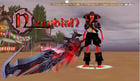
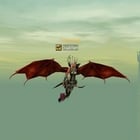
first results ^^ thx to Perry for such great tool
Still some work with colour
-------------------------------------------------------------------
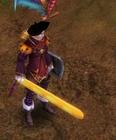
Here's more successful result ^^
Costume of Ichigo from anime Bleach

yurka333 is offline  
Old 12/03/2013, 18:37   #394
 
Ferpa_'s Avatar
 
elite*gold: 100
Join Date: Sep 2009
Posts: 1,195
Received Thanks: 379
Quote:
Originally Posted by yurka333 View Post
first results ^^ thx to Perry for such great tool
Still some work with colour
-------------------------------------------------------------------
Here's more successful result ^^
Costume of Ichigo from anime Bleach

nice, now make the getsuga sword
Ferpa_ is offline  
Old 01/08/2014, 15:30   #395
 
imTormentor's Avatar
 
elite*gold: 0
Join Date: Mar 2013
Posts: 22
Received Thanks: 2

help please
imTormentor is offline  
Old 01/13/2014, 14:58   #396
 
imTormentor's Avatar
 
elite*gold: 0
Join Date: Mar 2013
Posts: 22
Received Thanks: 2
how i can create my avatar
imTormentor is offline  
Old 01/23/2014, 02:24   #397
 
elite*gold: 0
Join Date: Mar 2010
Posts: 1
Received Thanks: 0
If you dont use a texture only change dimensions when you finish the weapon will have the same colors from the original but whit the edited dimensions?
darkciber1 is offline  
Old 01/23/2014, 13:39   #398
 
perrytje's Avatar
 
elite*gold: 0
Join Date: Feb 2008
Posts: 226
Received Thanks: 531
Yes the UV coords will be mapped to the same points on the model, so the texture still fits the same, but it might have stretched a bit.
perrytje is offline  
Old 01/23/2014, 17:15   #399
 
elite*gold: 0
Join Date: Nov 2012
Posts: 157
Received Thanks: 52
Perry have you managed yet to make all those models that aren't supported to be exported by this program workable yet?
Guar_dianS is offline  
Old 01/23/2014, 17:22   #400
 
perrytje's Avatar
 
elite*gold: 0
Join Date: Feb 2008
Posts: 226
Received Thanks: 531
I believe I know how to solve it, haven't implemented or tested it, though.
perrytje is offline  
Old 01/30/2014, 17:54   #401
 
elite*gold: 0
Join Date: Nov 2012
Posts: 157
Received Thanks: 52
Well an update to do it , would be appriciated some of us actually would like to see it ^.^
Guar_dianS is offline  
Old 03/01/2014, 03:31   #402
 
goodweed2's Avatar
 
elite*gold: 0
Join Date: Feb 2008
Posts: 155
Received Thanks: 25
can somebody help me with this error?


AND YES I USED TRIANGULATE thank you , and if you already posted it im sorry but its 4:30AM here and too tired to roll over 42 pages
goodweed2 is offline  
Old 03/01/2014, 12:01   #403
 
perrytje's Avatar
 
elite*gold: 0
Join Date: Feb 2008
Posts: 226
Received Thanks: 531
Quote:
Originally Posted by goodweed2 View Post
can somebody help me with this error?


AND YES I USED TRIANGULATE thank you , and if you already posted it im sorry but its 4:30AM here and too tired to roll over 42 pages
Select it...
perrytje is offline  
Old 03/01/2014, 15:02   #404
 
goodweed2's Avatar
 
elite*gold: 0
Join Date: Feb 2008
Posts: 155
Received Thanks: 25
i selected it when i tried to export it just i made the photo unselected. select it by right-clicking right? but 1 more question there are 3 parts over there in that glavie do i have to like put them togheter? couse i dont know how to do that its the head of the glavie the handle and a monkey in the top of the head of the glavie. how do i make them togheter the same object?


Here is what im talkin about , they are 3 parts do i have to put them togheter? and if yes how i do that? im sorry im pretty noob i dont know how to use blender to good yet thanks for your time.

goodweed2 is offline  
Old 03/01/2014, 15:10   #405
 
perrytje's Avatar
 
elite*gold: 0
Join Date: Feb 2008
Posts: 226
Received Thanks: 531
Check the textures for each part, and yes you have to join the parts, you can do this by selecting them all and going to Object > Join.
perrytje is offline  
Reply

Tags
bms, model, obj, pk2, tool


Similar Threads Similar Threads
[Tool] EDF converter
12/11/2012 - RFO Hacks, Bots, Cheats, Exploits & Guides - 26 Replies
Here is the Item edf Converter. I looked on the site to find it and still couldn't find it. After about 3 hours of looking (google didnt even show up with it lol) I found it and thought i would post it here for you guys to use. BTW im not A leecher If i PM you I Just lost the PW to the email on my other account and the account password look it up name is Dro in member list. ********* Edit *********
[TooL] AgBot Script Converter
09/08/2012 - SRO Hacks, Bots, Cheats & Exploits - 34 Replies
Hey E*PvP members. Here is a litle tool me and hussert ware working on. AgBot Script Converter Current Version 1.00 Screenshot: http://img126.imageshack.us/img126/7180/logonp1.pn g Functions:
SIlkroad Model Converter + View Sample [C#]
11/26/2010 - SRO Coding Corner - 13 Replies
I am finished with my C# BMS Converter: class BMSConverter { int charCount; int vertCount; int boneCount; int faceCount; string mtlLib; string meshGroup;
[Tool] Model Changer
08/06/2009 - SRO Hacks, Bots, Cheats & Exploits - 3 Replies
....
[TOOL] dxtbmpx -dds converter
03/26/2009 - CO2 Private Server - 0 Replies
dxtbmp I found a tool for converting dds files in normal grafic files and back. But i donīt know if this here is the right forum part How to use it? I.install the programm II. open the programm Converting dds to bmp III. press "File" and then "open" and chose the dds file that you want to convert


All times are GMT +1. The time now is 05:53.


Powered by vBulletin®
Copyright ©2000 - 2026, Jelsoft Enterprises Ltd.
SEO by vBSEO ©2011, Crawlability, Inc.
This site is protected by reCAPTCHA and the Google Privacy Policy and Terms of Service apply.

Support | Contact Us | FAQ | Advertising | Privacy Policy | Terms of Service | Abuse
Copyright ©2026 elitepvpers All Rights Reserved.