Register for your free account! | Forgot your password?

Go Back   elitepvpers > Popular Games > Silkroad Online > SRO Coding Corner
You last visited: Today at 01:26

  • Please register to post and access all features, it's quick, easy and FREE!

Advertisement


[PK2 TOOL] BMS Model converter

Discussion on [PK2 TOOL] BMS Model converter within the SRO Coding Corner forum part of the Silkroad Online category.

Reply
 
Old 03/26/2013, 09:07   #286
 
perrytje's Avatar
 
elite*gold: 0
Join Date: Feb 2008
Posts: 226
Received Thanks: 531
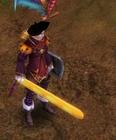
Yeah it is possible, I made this from scratch for example and put it ingame:


So it's definitly possible
perrytje is offline  
Thanks
1 User
Old 03/26/2013, 12:20   #287
 
3DProgrammer's Avatar
 
elite*gold: 0
Join Date: Feb 2012
Posts: 133
Received Thanks: 98
Great tool perrytje, sorry i asked you a question in message, you answered me & i couldn't reply back (because i was inactive > all my posts / messages was removed )

But you was right, the model wasn't in the right place & it worked

GL in your future programs ^^
3DProgrammer is offline  
Old 03/26/2013, 17:58   #288
 
imTormentor's Avatar
 
elite*gold: 0
Join Date: Mar 2013
Posts: 22
Received Thanks: 2
can you make things like this if you can please make explain to it


imTormentor is offline  
Old 03/26/2013, 19:46   #289
 
perrytje's Avatar
 
elite*gold: 0
Join Date: Feb 2008
Posts: 226
Received Thanks: 531
I know since I'm the one that made that, and no, I won't explain how. I'll tell you it's in .m files, good luck.
perrytje is offline  
Old 03/31/2013, 05:59   #290
 
elite*gold: 0
Join Date: Dec 2008
Posts: 1,600
Received Thanks: 1,154
I guess it isn't possible to add something like this or? The Model has a Animation.


Another thing is, a mate has imported a Blade and he saw that Blade in the Character Selection but once he logged in totally he received a Crash. Any Solution?^^
Lolill0 is offline  
Old 03/31/2013, 10:57   #291
 
perrytje's Avatar
 
elite*gold: 0
Join Date: Feb 2008
Posts: 226
Received Thanks: 531
About the model, it is possible, you'll have to give the vertices the right groups and weights for the bones though, which is extremely hard.

About your friend, if the blade works in character selection that means it works, the crash must be caused by something else.
perrytje is offline  
Old 03/31/2013, 21:32   #292
 
elite*gold: 0
Join Date: Dec 2008
Posts: 1,600
Received Thanks: 1,154
Alright, gotta look what I can do with Blender since I only imported OBJ with your Settings and then exported it again with OBJ but without changing anything just ticking the right Options on the left Side then saving it.

Geez, this is hard ^^
Lolill0 is offline  
Old 04/08/2013, 18:43   #293
 
elite*gold: 0
Join Date: Dec 2008
Posts: 1,600
Received Thanks: 1,154
Well I successfuly replaced a Monster/NPC but then it looks like this :


Normally it should look like this :


Also as I saw it, the Model has more then one Texture. Five at all ....

Isn't there a Way to make a Animation to a .BAN File ? Like a RDA to BAN?
Lolill0 is offline  
Old 04/08/2013, 18:49   #294
 
Snow*'s Avatar
 
elite*gold: 1
Join Date: Nov 2011
Posts: 2,532
Received Thanks: 1,440
Quote:
Originally Posted by Lolill0 View Post
Well I successfuly replaced a Monster but then it looks like this :
Also as I saw it, the Model has more then one Texture. Five at all ....

Isn't there a Way to make a Animation to a .BAN File ? Like a RDA to BAN?
Try something have 5 texture. Pretty sure it looks like that because it didn't load the whole DDJ files. (I don't have an example)
I know nothing about .BAN files.
But "I GUESS" you can make the client load them. Still dun know how.
Snow* is offline  
Thanks
1 User
Old 04/09/2013, 09:31   #295
 
perrytje's Avatar
 
elite*gold: 0
Join Date: Feb 2008
Posts: 226
Received Thanks: 531
Joymax just went the lazy way, in models if they have multiple texture files, they put each part in a different .bms with it's own texture (you know, the one you type in my converter), which then fetches the .ddj that belongs to that name from the .bms, so you'll have to split your model up.

I do have some research on BAN files but I haven't been able to get it working quite yet.
perrytje is offline  
Thanks
1 User
Old 04/09/2013, 22:09   #296
 
Snow*'s Avatar
 
elite*gold: 1
Join Date: Nov 2011
Posts: 2,532
Received Thanks: 1,440
Quote:
Originally Posted by perrytje View Post
I do have some research on BAN files but I haven't been able to get it working quite yet.
Maybe you can share what you got about BAN files, since we know nothing about it ^^
Snow* is offline  
Old 04/10/2013, 22:37   #297
 
elite*gold: 0
Join Date: Dec 2008
Posts: 1,600
Received Thanks: 1,154
So doing this Way should make it work?

Open OBJ File in Blender by Importing OBJ and then choose "Split" instead of "Keep Vertex Order". Then after we made the Settings and the Meshes, simply save the Model to OBJ again but with those Settings :


Now after this is done, I convert the OBJ File with the "SROBJ - Multi Bone" Function, only putting it Ingame then, getting a Animation from the Snake Monster in Jangan Cave B3 and then this Model should move like a Snake?


**** you, never thought doing such Stuff makes Fun xD
Lolill0 is offline  
Old 04/11/2013, 09:29   #298
 
perrytje's Avatar
 
elite*gold: 0
Join Date: Feb 2008
Posts: 226
Received Thanks: 531
You got the idea, but you need to save each part as a srobj for the animation to work on it I'm afraid. This means you'll have to split the parts manually. The regular obj format does not support vertex groups, which the client needs to animate.
perrytje is offline  
Thanks
1 User
Old 04/11/2013, 23:31   #299
 
elite*gold: 300
Join Date: Feb 2013
Posts: 5
Received Thanks: 1
Quote:
Originally Posted by perrytje View Post
You got the idea, but you need to save each part as a srobj for the animation to work on it I'm afraid. This means you'll have to split the parts manually. The regular obj format does not support vertex groups, which the client needs to animate.

[B]Hi all..
I CAN'T convert .obj to .bsm
flash3606 is offline  
Old 04/12/2013, 08:52   #300
 
elite*gold: 0
Join Date: Dec 2008
Posts: 1,600
Received Thanks: 1,154
Did you edited in Blender ?

If you Import the OBJ File, Click on "Keep Vertex Order" and untick everything.

Once you're done with adding a Mesh to the Model and editing the Size/Rotation of it, Export it to OBJ again, now the Settings.

Tick following Settings :

~ Selection Only
~ Includes Normals
~ Includes VUs
~ Triangulare Faces

With those, your Model does work 100% at converting.
Lolill0 is offline  
Thanks
2 Users
Reply

Tags
bms, model, obj, pk2, tool


Similar Threads Similar Threads
[Tool] EDF converter
12/11/2012 - RFO Hacks, Bots, Cheats, Exploits & Guides - 26 Replies
Here is the Item edf Converter. I looked on the site to find it and still couldn't find it. After about 3 hours of looking (google didnt even show up with it lol) I found it and thought i would post it here for you guys to use. BTW im not A leecher If i PM you I Just lost the PW to the email on my other account and the account password look it up name is Dro in member list. ********* Edit *********
[TooL] AgBot Script Converter
09/08/2012 - SRO Hacks, Bots, Cheats & Exploits - 34 Replies
Hey E*PvP members. Here is a litle tool me and hussert ware working on. AgBot Script Converter Current Version 1.00 Screenshot: http://img126.imageshack.us/img126/7180/logonp1.pn g Functions:
SIlkroad Model Converter + View Sample [C#]
11/26/2010 - SRO Coding Corner - 13 Replies
I am finished with my C# BMS Converter: class BMSConverter { int charCount; int vertCount; int boneCount; int faceCount; string mtlLib; string meshGroup;
[Tool] Model Changer
08/06/2009 - SRO Hacks, Bots, Cheats & Exploits - 3 Replies
....
[TOOL] dxtbmpx -dds converter
03/26/2009 - CO2 Private Server - 0 Replies
dxtbmp I found a tool for converting dds files in normal grafic files and back. But i donīt know if this here is the right forum part How to use it? I.install the programm II. open the programm Converting dds to bmp III. press "File" and then "open" and chose the dds file that you want to convert


All times are GMT +1. The time now is 01:27.


Powered by vBulletin®
Copyright ©2000 - 2026, Jelsoft Enterprises Ltd.
SEO by vBSEO ©2011, Crawlability, Inc.
This site is protected by reCAPTCHA and the Google Privacy Policy and Terms of Service apply.

Support | Contact Us | FAQ | Advertising | Privacy Policy | Terms of Service | Abuse
Copyright ©2026 elitepvpers All Rights Reserved.