Register for your free account! | Forgot your password?

Go Back   elitepvpers > Popular Games > Silkroad Online > SRO Coding Corner
You last visited: Today at 17:14

  • Please register to post and access all features, it's quick, easy and FREE!

Advertisement


[PK2 TOOL] BMS Model converter

Discussion on [PK2 TOOL] BMS Model converter within the SRO Coding Corner forum part of the Silkroad Online category.

Reply
 
Old 02/17/2012, 02:31   #16
 
elite*gold: 0
Join Date: Sep 2008
Posts: 34
Received Thanks: 2
a other ^^
tidjana972 is offline  
Old 02/17/2012, 05:44   #17
 
LastThief*'s Avatar
 
elite*gold: 60
Join Date: Feb 2012
Posts: 3,942
Received Thanks: 6,474
Quote:
Originally Posted by tidjana972 View Post
ty , i am doing other weapon like glaive !! i will show after lol


The glaive is awesome great work
LastThief* is offline  
Old 02/17/2012, 15:27   #18
 
perrytje's Avatar
 
elite*gold: 0
Join Date: Feb 2008
Posts: 226
Received Thanks: 531
Quote:
Originally Posted by Nezekan View Post
still waiting for my ponies.
You'll be the first to hear when I figure moving meshes out. Actually, you wont, but it'll be pretty fast.
perrytje is offline  
Old 02/17/2012, 17:59   #19
 
elite*gold: 0
Join Date: Sep 2008
Posts: 34
Received Thanks: 2
ty , but It's a pity for bms converter ,it there's no model type for armor clothe and light
, its only shield , weapon , hat , and attach

ps : sorry for my english
tidjana972 is offline  
Old 02/18/2012, 13:35   #20
 
perrytje's Avatar
 
elite*gold: 0
Join Date: Feb 2008
Posts: 226
Received Thanks: 531
There's only a limited number of model types, since the types you named all have animations linked to them. I'm working on it, don't worry.
perrytje is offline  
Old 02/19/2012, 20:08   #21
 
elite*gold: 0
Join Date: Mar 2009
Posts: 2,748
Received Thanks: 2,010
Quote:
Originally Posted by perrytje View Post
You'll be the first to hear when I figure moving meshes out. Actually, you wont, but it'll be pretty fast.
now that hurts my feelings
Nezekan is offline  
Old 02/20/2012, 18:01   #22
 
elite*gold: 0
Join Date: Sep 2008
Posts: 34
Received Thanks: 2
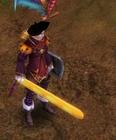
Hi all i customed a sword d14 , if you want it take this :

ps : if you have error on login load character , change juste height texture to 1500 with photoshop
tidjana972 is offline  
Old 02/20/2012, 22:01   #23
 
perrytje's Avatar
 
elite*gold: 0
Join Date: Feb 2008
Posts: 226
Received Thanks: 531
Quote:
Originally Posted by tidjana972 View Post
Hi all i customed a sword d14 , if you want it take this :

ps : if you have error on login load character , change juste height texture to 1500 with photoshop
I don't reccomend changing the texture size, if it doesnt work, it probably went wrong somewhere else.

And Nezekan, I still love you <3
perrytje is offline  
Thanks
2 Users
Old 02/20/2012, 22:25   #24
 
omier44's Avatar
 
elite*gold: 0
Join Date: Apr 2009
Posts: 38
Received Thanks: 10
Truly awesome release. Now i could start working on my custom chinese weapons that i made sketches of before.

The glaive model is finished, not yet textured though.
omier44 is offline  
Old 02/21/2012, 01:18   #25
 
elite*gold: 0
Join Date: Sep 2008
Posts: 34
Received Thanks: 2
nice !! glaive omier44 and good luck for texture lol
tidjana972 is offline  
Old 02/27/2012, 16:49   #26
 
elite*gold: 0
Join Date: Oct 2010
Posts: 19
Received Thanks: 0
I looked at the files with little difference perrytje XVI32
Example 1: avatar_m_angel_wing_dress.bms "Bip01 spinel" Hex: "42 69 70 30 31"
Example 2: avatar_w_eu_wedding.bms "Bip01 R Thigh" Hex: "42 69 70 30 31 20 52 20 54 68 69 67 68"
Topic you noticed all the differences Dress Making sure that youth start reputation all here. Iside here if you solve the dress is completed.

I'm sorry If I turned to google translate sentences
kadir21010 is offline  
Old 02/27/2012, 17:04   #27
 
perrytje's Avatar
 
elite*gold: 0
Join Date: Feb 2008
Posts: 226
Received Thanks: 531
Quote:
Originally Posted by kadir21010 View Post
I looked at the files with little difference perrytje XVI32
Example 1: avatar_m_angel_wing_dress.bms "Bip01 spinel" Hex: "42 69 70 30 31"
Example 2: avatar_w_eu_wedding.bms "Bip01 R Thigh" Hex: "42 69 70 30 31 20 52 20 54 68 69 67 68"
Topic you noticed all the differences Dress Making sure that youth start reputation all here. Iside here if you solve the dress is completed.

I'm sorry If I turned to google translate sentences
I already know how it works, I just need a good way to put the different groups into blender and also make them editable.
perrytje is offline  
Old 02/27/2012, 18:50   #28
 
elite*gold: 0
Join Date: Oct 2010
Posts: 19
Received Thanks: 0
Well I dont know how to dress model manually for hands ?
kadir21010 is offline  
Old 03/03/2012, 14:12   #29
 
3DProgrammer's Avatar
 
elite*gold: 0
Join Date: Feb 2012
Posts: 133
Received Thanks: 98
its really awesome now all ppl will be able to create their custom weapons
even better then joymax got
3DProgrammer is offline  
Old 03/03/2012, 15:25   #30
 
elite*gold: 0
Join Date: Mar 2009
Posts: 248
Received Thanks: 118
There is also a milkshape plugin made by Cruor at

That's where this

comes from.
Vinator is offline  
Reply

Tags
bms, model, obj, pk2, tool


Similar Threads Similar Threads
[Tool] EDF converter
12/11/2012 - RFO Hacks, Bots, Cheats, Exploits & Guides - 26 Replies
Here is the Item edf Converter. I looked on the site to find it and still couldn't find it. After about 3 hours of looking (google didnt even show up with it lol) I found it and thought i would post it here for you guys to use. BTW im not A leecher If i PM you I Just lost the PW to the email on my other account and the account password look it up name is Dro in member list. ********* Edit *********
[TooL] AgBot Script Converter
09/08/2012 - SRO Hacks, Bots, Cheats & Exploits - 34 Replies
Hey E*PvP members. Here is a litle tool me and hussert ware working on. AgBot Script Converter Current Version 1.00 Screenshot: http://img126.imageshack.us/img126/7180/logonp1.pn g Functions:
SIlkroad Model Converter + View Sample [C#]
11/26/2010 - SRO Coding Corner - 13 Replies
I am finished with my C# BMS Converter: class BMSConverter { int charCount; int vertCount; int boneCount; int faceCount; string mtlLib; string meshGroup;
[Tool] Model Changer
08/06/2009 - SRO Hacks, Bots, Cheats & Exploits - 3 Replies
....
[TOOL] dxtbmpx -dds converter
03/26/2009 - CO2 Private Server - 0 Replies
dxtbmp I found a tool for converting dds files in normal grafic files and back. But i donīt know if this here is the right forum part How to use it? I.install the programm II. open the programm Converting dds to bmp III. press "File" and then "open" and chose the dds file that you want to convert


All times are GMT +1. The time now is 17:15.


Powered by vBulletin®
Copyright ©2000 - 2025, Jelsoft Enterprises Ltd.
SEO by vBSEO ©2011, Crawlability, Inc.
This site is protected by reCAPTCHA and the Google Privacy Policy and Terms of Service apply.

Support | Contact Us | FAQ | Advertising | Privacy Policy | Terms of Service | Abuse
Copyright ©2025 elitepvpers All Rights Reserved.