Okay, so I've been on EPVP for a while, and i don'th think I've noticed any guides on how to make edits on gimp, so here goes.
Why:
gimp is free (YAY!), and my lazy *** doesn't feel like torrenting a huge file like Photoshop.
How: download the attached .dds plugin file, and read the readme (note: where it says Program Files, i use vista x64, and thats program files (x64) for me)
If you are too lazy, here it is:
gimp-dds 2.0.9
(C) Copyright 2004-2008 Shawn Kirst < >
>
To install, extract these files to your GIMP plugins directory.
This directory is usually located at:
C:\Program Files\GIMP-2.0\lib\gimp\2.0\plug-ins
now, all you have to do is go into your Conquer folder and open up one of those .dds files.
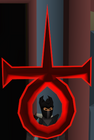
Heres a screenie of editing the 2nd RB effect in TrixyCO







![[GUIDE] Making Edits In Gimp!](https://www.elitepvpers.com/forum/iconimages/co2-weapon-armor-effects-interface-edits/guide-making-edits-gimp_ltr.gif)







 but still nice guild


