|
You last visited: Today at 17:04
Advertisement

SCRENNSHOT
Discussion on SCRENNSHOT within the Silkroad Online forum part of the Popular Games category.
 10/28/2009, 18:26
|
#1
|

elite*gold: 0 
Join Date: Jan 2008
Posts: 278
Received Thanks: 25
|
 SCRENNSHOT
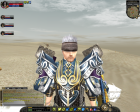
When I take a screenshot with my pc while playing sro , it does take it which means if i go to msn and i do CTRL+V it will show up to the guy but when I go to sro folder I can't find the scrennshot that I just toke.. any sug/idea? 
|

|
|
|
10/28/2009, 19:11
|
#2
|

elite*gold: 20
Join Date: Dec 2007
Posts: 973
Received Thanks: 155
|
take them with print screen .Not with ctrl+alt+print screen.
|
|
|
|
|
10/29/2009, 10:41
|
#3
|

elite*gold: 0
Join Date: Oct 2009
Posts: 570
Received Thanks: 280
|
lol dude when you press print screen u need to go in paint and there press ctrl+v, then save it as .jpg and you got picture -.-
Thanx me if i help! 
|
|
|
|
|
10/29/2009, 12:24
|
#4
|

elite*gold: 40
Join Date: Oct 2009
Posts: 1,202
Received Thanks: 259
|
marijo21 no you dont... you dont need ctrl+v just press print screen only and it will show up in your silkroad screenshot folder
|
|
|
|
|
10/31/2009, 22:02
|
#5
|
elite*gold: 0
Join Date: Jan 2008
Posts: 278
Received Thanks: 25
|
Quote:
Originally Posted by marijo21

lol dude when you press print screen u need to go in paint and there press ctrl+v, then save it as .jpg and you got picture -.-
Thanx me if i help! |
That's not what i'm looking for. I want it to be in my sro folder.
Quote:
Originally Posted by LittleDreamer
marijo21 no you dont... you dont need ctrl+v just press print screen only and it will show up in your silkroad screenshot folder
|
Yeah i tried and it doesnt work i'm not coming from another planet..i already toke like 3 scrennshots but now it doesnt want to anymore. after i started using testosteron i think that's why. anyone know?
|
|
|
|
|
10/31/2009, 22:43
|
#6
|
elite*gold: 40
Join Date: Oct 2009
Posts: 1,202
Received Thanks: 259
|
it works for me even with testosterone and sbot..
|
|
|
|
|
10/31/2009, 23:48
|
#7
|

elite*gold: 19
Join Date: Aug 2007
Posts: 2,731
Received Thanks: 1,801
|
are you sure your screenshot folder is named ScreenShot ? ^^
|
|
|
|
|
11/01/2009, 00:31
|
#8
|
elite*gold: 0
Join Date: Jan 2008
Posts: 278
Received Thanks: 25
|
Quote:
Originally Posted by HaGsTeR
are you sure your screenshot folder is named ScreenShot ? ^^
|
Yeah... C:\Program Files\Silkroad\ScreenShot
|
|
|
|
|
11/01/2009, 12:45
|
#9
|
elite*gold: 0
Join Date: Feb 2008
Posts: 237
Received Thanks: 26
|
you can use xFire or Fraps to make screenshots
|
|
|
|
|
11/01/2009, 17:24
|
#10
|
elite*gold: 0
Join Date: Jan 2008
Posts: 278
Received Thanks: 25
|
Quote:
Originally Posted by KaLoo
you can use xFire or Fraps to make screenshots
|
I want it just like everyone else I know i can take a scrennshot in different ways
|
|
|
|
|
11/02/2009, 04:52
|
#11
|

elite*gold: 0
Join Date: Aug 2009
Posts: 10
Received Thanks: 1
|
Heya, ummm u can try to delate/move existing 'screenshot' folder and then snap a screenshot again. Bcuz usually new 'screenshot' folder will be automatically created if it's not there.
GL
|
|
|
|
|
11/02/2009, 04:54
|
#12
|
elite*gold: 19
Join Date: Aug 2007
Posts: 2,731
Received Thanks: 1,801
|
maybe ur screenshot Button isnt working tho ^,^
|
|
|
|
|
11/02/2009, 05:10
|
#13
|
elite*gold: 260
Join Date: Aug 2008
Posts: 560
Received Thanks: 3,781
|
This is a Windows Vista issue (I see you are using Vista in your XFile profile). You have to make sure sro_client.exe is ran with Administrator privileges in order to save files in the C:\program files folders.
You can change the properties of sro_client.exe to require Administrator or you can move your Silkroad directory into your User documents folder and run from there instead.
|
|
|
|
|
11/03/2009, 17:55
|
#14
|
elite*gold: 0
Join Date: Jan 2008
Posts: 278
Received Thanks: 25
|
Quote:
Originally Posted by pushedx
This is a Windows Vista issue (I see you are using Vista in your XFile profile). You have to make sure sro_client.exe is ran with Administrator privileges in order to save files in the C:\program files folders.
You can change the properties of sro_client.exe to require Administrator or you can move your Silkroad directory into your User documents folder and run from there instead.
|
Or i can just turn off user account control
When I launch sro_client with loader it doenst want to take screnn but normally it does i just realized that
|
|
|
|
|
11/03/2009, 17:57
|
#15
|
elite*gold: 0
Join Date: Jan 2008
Posts: 278
Received Thanks: 25
|
Quote:
Originally Posted by _SilentSoul_
Heya, ummm u can try to delate/move existing 'screenshot' folder and then snap a screenshot again. Bcuz usually new 'screenshot' folder will be automatically created if it's not there.
GL
|
Already tried.No changes
Quote:
Originally Posted by HaGsTeR
maybe ur screenshot Button isnt working tho ^,^
|
Nah if you read everything I said..I already said when I take a scrennshot and go on paint and CTRL V it shows up..
|
|
|
|
All times are GMT +1. The time now is 17:05.
|
|