🔥 STEALTH Full for Rust 💣 Aimbot, Visuals, Chams, Exploits ✅ NFKCHEATS.COM
Discussion on 🔥 STEALTH Full for Rust 💣 Aimbot, Visuals, Chams, Exploits ✅ NFKCHEATS.COM within the Rust Trading forum part of the Shooter Trading category.
🔥 STEALTH Full for Rust 💣 Aimbot, Visuals, Chams, Exploits ✅ NFKCHEATS.COM
:::::::::::::::::::::::::: ABOUT ::::::::::::::::::::::::::
Status:click here to check Supported OS: Windows 10 (from 1809), Windows 11 Supported Game Mode: Fullscreen, Windowed, Borderless Supported Processors: Intel and AMD HWID Spoofer: No
The processor must have support for AVX instructions.
Only support UEFI bios mode.
It is recommended reading:
We have the most detailed instructions on how to start and activate this product.
We have fast technical support on the website, which is available almost 24/7. If you have any problems - we will help you.
—— FEATURES ——
[ AIMBOT ]
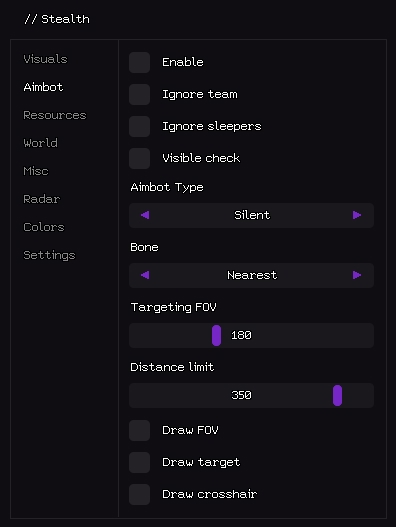
Enable – Turn the aimbot on.
Ignore team – Skip teammates.
Ignore sleepers – Skip sleeping players.
Visible check – Lock only line-of-sight targets.
Aimbot Type – Silent (no mouse movement) or Mouse (moves cross-hair).
Bone – Body part to aim: Head / Chest / Pelvis / Nearest.
The UNDETECTED status does NOT mean that you cannot get a ban, there is a risk of getting a ban ALWAYS with ANY software. Sooner or later, the ban will be in any case, the best way to avoid a game blocking is not to use cheats. If you are afraid for your account, please do not use cheats!
If your account is blocked, there is no refund for the cheat.
If your account is blocked, there is no refund for your account.
We do not refund if your Windows does not match our description.
We do not refund and do not exchange if you bought the wrong product.
We do not refund funds if you have purchased the program, and for some reason it has suspended its work for a certain or indefinite period.
A guaranteed refund is carried out only if the program does not work for you at the first start.
If you have a blockage in the program (which you must know), but you buy it, then the funds for the purchase will not be returned to you.
[Selling] ANTICHEAT.BINGO - 💣💣💣Broken Arrow Hacks💣💣💣 07/10/2025 - Unlisted Games Trading - 2 Replies https://anticheat.bingo/data/dbtechEcommerce/produ ctIcons/0/184.png?1731589015
✅Windows 10/11✅
✅AMD/Intel✅
✅EAC Undetected✅
https://i.ibb.co/XVwyy53/bing-features.png
all esp on units and infantry
no fog
[Selling] ✅✅✅_WWW.D3BOOST.COM_✅✅✅ ✅✅✅_SEASON_JOURNEY_✅✅✅_COSMIC_WINGS_✅✅✅ ✅✅✅_PARAGON_BOOST_✅✅✅ 11/26/2017 - Diablo 3 Trading - 7 Replies https://i.imgur.com/4S5m2MU.gif
🔥 ABOUT US 🔥
At D3Boost, we care about our customers and that’s why we’re constantly looking to improve our boosting services.
We started operating back in the days when Diablo 3 was first released in May 2012.
D3Boost was established by a group of eSports Gamers who wanted to serve the community by mainly selling Diablo 3 Boosting & Power Leveling services.
Although Diablo 3 is and will remain our main figure, we’re also proud to be offering Destiny 2...







 🔥 STEALTH Full for Rust 💣 Aimbot, Visuals, Chams, Exploits ✅ NFKCHEATS.COM