UP GAME - private cheats for any games
OUR WEBSITE - up-game.pro
UP GAME - private cheats for any games
OUR WEBSITE - up-game.pro
Take your gaming strategy to the next level with our cheats for a variety of games. Get access to exclusive features, gain an edge over your opponents and conquer virtual worlds. Explore a wide range of cheats on our website and experience the difference in the game today!
ORIGINS

Supported Game Client:STEAM
Built-in Spoofer:No
Anti-Cheat:EAC
OBS Record Bypass:No
Supported Game Modes:Windowed, Frameless, Fullscreen
Supported Processors:INTEL
Only Supported Systems:Windows 10, 11 (x64) 21H1, 21H2, 22H2, 21H2, 22H2, 23H2, 24H2
-----------------------------
Active (Key Bind Selection) — Activate Tab
Team check — Team Check
Ignore sleepers — Ignore Sleepers
Visible check — Visibility Check
Type (Slider Selection) — Type (Silent — Invisible, Mouse — Visible via Mouse)
Bone (Slider Selection) — Bone (Nearest, Head, Pelvis, Chest)
FOV (1-300) — FOV (Radius)
Time to aim — Time to Aim
On target delay — Target Change Delay
Max distance (1-400) — Max Distance
Visual components
Draw FOV — Draw FOV
Draw aim target — Draw Aim Target
VISUALS
Characters
NPC — Display NPCs, including static ones
Sleeper — Display Sleepers
Skeleton (Color Selection) — Skeleton Display (Color Selection)
TeamID (Color Selection) — Team ID Display (Color Selection)
Nickname (Color Selection) — Nickname Display (Color Selection)
Held item — Display Active Item in Hand
Quick slots — Display Quick Slot Items as a List
3D Box — Display Characters Inside a 3D Box
Distance — Display Distance to Characters
Max distance for player (1-400) — Max Distance for Players
Max distance for NPC (1-400) — Max Distance for NPCs
Characters corpse
Active (Color Selection) — Activate Tab (Color Selection)
Distance — Display Distance to Player Corpses
Max distance (1-400) — Max Distance for Player Corpses
Animals corpse
Active (Color Selection) — Activate Tab (Color Selection)
Distance — Display Distance to Animal Corpses
Max distance (1-400) — Max Distance for Animal Corpses
Animals
Active (Color Selection) — Activate Tab (Color Selection)
Horse — Display Horses
Bear — Display Bears
Boar — Display Boars
Stag — Display Stags
Wolf — Display Wolves
Shark — Display Sharks
Chicken — Display Chickens
Display health — Display Animal Health
Horse energy — Display Horse Energy
Distance — Display Distance to Animals
Max distance for horse (1-400) — Max Distance for Horses
Max distance for other (1-400) — Max Distance for Other Animals
Vehicles
Active (Color Selection) — Activate Tab (Color Selection)
Minicopter — Display Minicopters
Modular car — Display Modular Cars
Drones — Display Drones
Bike — Display Bikes
Motorcycle — Display Motorcycles
Snowmobile — Display Snowmobiles
Submarines — Display Submarines
Tugboat — Display Tugboats
Rowboat — Display Rowboats
RHIB — Display Military Boats
Diver propulsion — Display Diver Propulsion Devices
Attack helicopter — Display Attack Helicopters
Scrap helicopter — Display Scrap Helicopters
Health — Display Vehicle Health
Distance — Display Distance to Vehicles
Max distance (1-400) — Max Distance for Vehicles
Traps
Active (Color Selection) — Activate Tab (Color Selection)
Shotgun trap — Display Shotgun Traps
Auto turret — Display Auto Turrets
Flame turret — Display Flame Turrets
Snap trap — Display Snap Traps
Can alarm — Display Can Alarms
Landmine — Display Landmines
SamSite — Display SAM Sites
NPC turrets — Display NPC Turrets in Safe Zones
Status — Display Trap Status
Health — Display Trap Health
Max distance for SamSite (1-400) — Max Distance for SAM Sites
Max distance for other (1-400) — Max Distance for Other Traps
LOOT
Extractables
Wood — Display Wood Nodes
Stone — Display Stone Ore Nodes
Metal — Display Metal Ore Nodes
Sulfur — Display Sulfur Ore Nodes
Distance — Display Distance to Resources
Max distance (1-400) — Max Distance for Resources
Collectibles
Stone — Display Collectible Stone
Metal — Display Collectible Metal
Sulfur — Display Collectible Sulfur
Wood — Display Collectible Wood Stumps
Hemp — Display Hemp
Diesel — Display Diesel Fuel
Distance — Display Distance to Collectibles
Max distance for diesel (1-400) — Max Distance for Diesel Fuel
Max distance for other (1-400) — Max Distance for Other Collectibles
Radtown loot
Active — Activate Tab
Distance — Display Distance to Radtown Loot
Max distance (1-400) — Max Distance for Radtown Loot
Food
Active — Activate Tab
Food crate — Display Food Crates
Corn — Display Corn
Mushroom — Display Mushrooms
Pumpkin — Display Pumpkins
Potato — Display Potatoes
Other — Display Other Food Items
Distance — Display Distance to Food Items
Max distance (1-400) — Max Distance for Food
Dropped items
Active (Color Selection) — Activate Tab (Color Selection)
Distance — Display Distance to Dropped Items
Max distance (1-400) — Max Distance for Dropped Item
Other
AirDrop — Display AirDrops
Chinook crate — Display Chinook Crates (with timer)
Distance — Display Distance to Other Items
Deployables
Active (Color Selection) — Activate Tab (Color Selection)
Cupboards — Display Cupboards
Storages — Display Storage Boxes
Workbench — Display Workbenches
RF receiver — Display RF Receivers
RF broadcaster — Display RF Broadcasters
Enemy tracker — Display Motion Sensors
Cupboard upkeep — Display Cupboard Upkeep Time
Distance — Display Distance to Deployables
Max distance for cupboards (1-400) — Max Distance for Cupboards
Max distance for workbench (1-400) — Max Distance for Workbenches
Max distance for other (1-400) — Max Distance for Other Deployables
MISC
Misc features
Draw crosshair — Display Crosshair
Anti recoil — Partial Recoil Compensation
Anti spread — Partial Bullet Spread Compensation
Anti sway — Partial Weapon Sway Compensation
Automatic weapon mode — Convert Any Weapon to Automatic
Success EOKA — EOKA Always Fires on First Try
Melee weapon improvements — Increased Melee Weapon Range and Radius
Custom time (1-24) — Set Custom Time of Day (1-24)
Fulbright — Improved Visibility in Caves
Debug camera (1-5) (Key Bind Selection) — Debug Camera Flight (Speed 1-5, Key Bind Selection)
Enemies Counter (The counter can be moved with the mouse) — Display All Enemies in Render Range (Movable
SKINS
Skins (Currently in Development)
RADAR
Radar settings
(The counter can be moved with the mouse)
Active — Activate Tab
Only players — Display Only Players, Ignore NPCs
Show sleepers — Display Sleeping Players
Directions — Display Player View Direction (Line)
Name — Display Player Names
Size (50-200) — Radar Size
Text size (10-20) — Text Size
Distance — Display Distance on Radar
Draw distance — Set Radar Render Distance
SETTINGS
General settings
Language — Language Selection (Currently English Only)
Visuals font size (10-20) — Set Visuals Font Size
Menu toggle (Key Bind Selection) — Menu Toggle Key Bind Selection
Header — Menu Header Color
FULL VERSION
1 day - 7,27$ BUY7 day - 36,42$ BUY
30 day - 72,86$ BUY
---------------------------------------------------------------
NAIM

Cheats System Requirements
Operating Systems: Windows 10, 11, including 24h2.
Processors: Intel and AMD.
Support for all types of mice and keyboards.
Games with strong anti-cheat protection require KmBox to minimize the risk of ban. A list of such games is given below.
-----------------------------
Functionality of the NAIM
AimBot AI cheat:
Sensitivity: Adjusts the aiming speed.
Target: Auto | Head | Body - Definition of the goal.
Recoil Control (RCS): Off | Low | Intermediate | High | Ultra | Extra - Adjustment of the recoil control force.
Assist:
Delay: The time it takes to activate assistance after the last use of the neural network bind.
Binds: Up to two binds can be installed to activate AIM.
AutoShot:
Speed: Sets the rate of automatic fire.
HitChancer: Simulates game physics to calculate the spread level.
Visuals:
Visible ESP (Box): Shows a border around the enemy being attacked.
Visible ESP: Red indicator above the current target and orange above the next one.
AimBot/Neural FOV: Displays the aiming radius of the AIM/neural network.
FPS: Information about the FPS and detected enemies in the corner of the screen.
Confidience: A measure of the confidence of a neural network near an enemy.
Hide Visual Effects/Errors: Configure the security of visual effects and logs.
OBSbypass: Hide menus and visual effects when recording your screen.
Hide: Removes the menu from the taskbar and the Alt+Tab menu.
AlwaysTop: The menu is displayed on top of the game.
Watermark: Information about the NAIM version in the upper right corner.
Tab: Displays information about settings and the player table by pressing the Tab key.
Neural network (Neural):
Model: Model Selection: Lite - Fast, Pro - Accurate, Ultra - Best.
Do not detect prone enemies: Ignore prone targets.
Dynamic FOV: The neural network tracks enemies across the entire screen, the FOV moves behind the target.
FOV Neural/AimBot: Configure FOV vision of the neural network and aiming in general.
Scripts:
Add Scripts (AddScripts): Add a custom script or .py/.napi file.
Docs: A guide to developing scripts in NAPI.
EditPanel: Manage scripts and view information.
List of Scripts: A list of installed scripts available for running.
NAPI's: Script Creation and Loading
Profile:
Profile: Shows your account details, including login, role, ID, registration date, and time remaining.
PCStats: Demonstrates NAIM performance on your device and scores compatibility on a 10-point scale.
Activation Keys: Redeem keys you've purchased or won.
Telegram bot: Manage your account, participate in subscription games with other users and win contests.
Other:
- Screen size: Play in 4:3 format and adjust the resolution as you like.
Optimization:
Priority: Prioritize the process to improve the neural network.
Refresh rate: Use frame interpolation to reduce load without losing smoothness.
Round:
Mouse movement: Apply KmBox*, drivers, and other mouse emulation techniques.
Screen Capture: Switch between screen capture methods, including support for capture cards*.
Your PC: Shows information about the graphics card, processor, and monitor for diagnostics.
Version Information: Displays download speed, build date, and version.
FULL VERSION
7 day 10$ -
BUY14 day 16$ -
BUY
30 day 22$ -
BUY90 day 49$ -
BUY
---------------------------------------------------------------
Memez External

Game client: Steam
System -- Windows 10-11 (2004-24h2)
Processor -- INTEL \ AMD
Video card -- NVIDIA / AMD
Window mode -- Fullscreen in window
-----------------------------
Aimbot
enable aimbot - enable
aimbot fov - aimbot radius
aimbot bind - aimbot key assignment
draw aimbot fov - display aimbot radius
enable weapon chams - Hand and weapon silhouettes
Player ESP
enable player box esp - enable display of squares on players
enable player distance esp - Display distance to player
enable player name esp - Display player name
enable player weapon esp - Display weapon in player's hands
enable player team id esp - Display player team ID
enable player chams - Player silhouettes (White Through Walls, Red Glow, Green)
max distance (10-250) - Maximum distance for displaying
Loot ESP
enable stone esp - enable display of stone
enable sulfur esp - enable display of sulfur
enable metal esp - enable display of metal
enable hemp esp - enable display of hemp
enable supply crate esp - enable display of supply crate
enable military crate esp - enable display of military enable tool crate
esp - enable tool crate display
enable basic crate esp - enable basic crate display
enable medical orate esp - enable medical crate display
enable elite orate esp - enable elite crate display
enable dropped items esp - enable items on the ground display
enable corpse esp - enable corpse display
enable cupboard esp - enable cupboard display
Misc
Debug Camera - Free camera mode.
No Recoil - Disables weapon recoil
% Recoil - Adjust recoil
100% EoKa - A homemade pistol always shoots with 1 hit
Bright Night - Bright Night
Battle Mode - Battle mode
AutoFarmBot - Autofarm bot
Save/Load - Save/Load config
Language - Select Language (English, Russian)
FULL VERSION
1 day 4.25$ -
BUY7 day 14.45$ -
BUY
30 day 24.17$ -
BUY
---------------------------------------------------------------
Mason Full

System requirements
Supported game version: Steam
Supported game mode: Windowed / Fullscreen in window
Supported Windows OS: 10x64, versions (2004 / 20H2 / 21H1 / 21H2 / 22H2), you can check your build using the instructions HERE . Optional support for Windows 11, functionality is not guaranteed
Supported anti-cheats: Easy Anti-Cheat
Supported processors: Intel and AMD
Support for invisibility in videos or screenshots: Yes
BIOS boot mode: UEFI, you can check what format is used in the system using the instructions HERE
The boot record format of the system disk: GPT, you can check which format is used in the system using the instructions HERE
Additional Windows system requirements: Enable VT-x / VT-d (Virtualization) / Enable Hyper-V / Disable Secure Boot
USB Flash Drive Required: Yes
-----------------------------
VISUALISATION
Tab enable / Enable ESP
Show bounding box / Show 2D squares
Show snapline / Show lines
Show distance / Show distance
Show player name / Show player names
Show player weapon / Show players weapons
Show player belt items / Show player belt items
Show nearby collectible / Show nearby collectible
Show nearby dropped items / Display items dropped by players nearby when using the "show nearby collectibles" function
Show NPC / Display NPC
Show Scientist / Show Scientists
Show animals / Show animals
Show vehicle / Display vehicle and its name
Show recycler / Show recycler
Show copters / Show copter
Show crates / Show crates
Show cupboards / Show cupboards
Show food / Show food
Show supply drop / Show airdrop
Show traps / Show traps
Show turrets / Show turrets
Show sulfur ore / Show sulfur
Show metal ore / Show iron ore
Show stone ore / Show stone ore
Show wood pile / Show wood pile
Ignore sleepers / Ignore sleepers
Players distance limit / Set the display distance of players
Object distance limit / Set the display distance of objects
MISCELLANEOUS
Tab enable / Enable additional features
Full bright / Allows you to see at night as if it were day
CONFIGURATION
Save cpu / Saving processor resources
Menu key / Set the key to enable the reader menu
Panic key / Allows you to urgently disable the cheat
Battle mode key / Button to enable the mode of displaying only players
Load config from clipboard / Load config from clipboard
Save config to clipboard / Save config to clipboard
GRAPHICAL USER INTEGRATION
Show aim radius / Display aimbot radius
Show crosshair / Display crosshair in the center of the screen
Show radar / Show radar
Radar size / Set the size of the displayed radar
Radar radius / Set the radius of the radar
* The functionality of the program can be changed at any time at the discretion of the developer, but we always try to keep the information up to date
FULL VERSION
1 day 5$ -
BUY7 day 20$ -
BUY
30 day 45$ -
BUY
---------------------------------------------------------------
THOMAS

System requirements
Built-in spoofer: No
Additional requirements: Requires a flash drive to run
Bypass recording in OBS: No
Supported game modes: Windowed, Frameless
Supported processors: Intel and AMD with AVX2 support
Supported systems: Windows 10, 11
-----------------------------
Lite
F2 - Silent Aim
F4 - No Recoil
F5 - Semi Automatic
F6 - Insta Eoka
F8 - Box Esp (Если боксы не включаются, введите в консоль команду : culling.toggle 1)
F10 - Chams (Введите в консоль команду culling.toggle 0, чтобы боксы не исчезали)
F11 - Always Day
F12 - Remove Constractions
--------------------------------------------------
Full
AIMBOT
Enable Aim Assist – Включить аим-ассист
Aim Key Bind – Клавиша аима
Silent – Сайлент аим
Smooth – Плавность
Draw Fov – Отображать FOV
Fov Range – Радиус FOV
Aiming Distance – Дистанция аима
Draw line to target – Линия до цели
Draw predicted pos – Показывать предикт позиции
Select Bone – Выбор кости
Norecoil – Без отдачи
Fast Eoka – Быстрая Eoka
Semi Automatic – Полуавтомат
Always Shoot – Всегда стрелять
No Spread – Без разброса
No Sway – Без раскачки
Insta Compound – Мгновенный Compound
Insta Bow – Мгновенный лук
Rapid Fire – Быстрая стрельба
ESP Players
Enable – Включить
Render Distance – Дистанция прорисовки
Box – Бокс
Box Type – Тип бокса
Filled Box – Заполненный бокс
Skeleton – Скелет
Skeleton Thichness – Толщина скелета
View Direction – Направление взгляда
View Dir Length – Длина направления взгляда
Player Name – Имя игрока
Player Distance – Дистанция до игрока
Player Weapon – Оружие игрока
Team ID – ID команды
Teammates – Тиммейты
Sleepers – Спящие
Wounded – Раненые
Scientist – Учёные
Notify looking at you – Уведомлять, если смотрят на вас
Enable Arrows – Включить стрелки
Show Guns – Показывать оружие
Blinking – Мигание
Blinking Speed – Скорость мигания
Arrow Size – Размер стрелки
Arrow Radius – Радиус стрелок
Hotbar Belt – Пояс (хотбар)
Hotbar Wear – Экипировка (хотбар)
Hotbar Type – Тип хотбара
Hotbar Size – Размер хотбара
Enable Radar – Включить радар
Radar Opacity – Прозрачность радара
Lines – Линии
Lines Opacity – Прозрачность линий
Lines Thickness – Толщина линий
Fov Zone – Зона FOV
Player Size – Размер игрока
Radar Size – Размер радара
Radar Scaling – Масштаб радара
WORLD
Enable Text Esp – Включить текстовый ESP
Enable Farm Esp – Включить ESP ресурсов
Farm Distance – Дистанция ресурсов
Enable Farm Distance – Включить дистанцию ресурсов
Enable World Item Esp – Включить ESP предметов
World Distance – Дистанция предметов
Enable World Item Distance – Включить дистанцию предметов
Sulfur – Сера
Metal – Металл
Stone – Камень
Hemp – Конопля
Crates – Ящики
Cupboards – Шкафы (TC)
Sleeping bags – Спальные мешки
Workbench 1 – Верстак 1
Workbench 2 – Верстак 2
Workbench 3 – Верстак 3
Gun trap – Ловушка с дробовиком
Turret – Турель
Sam site – SAM-установка
Flame turret – Огнемётная турель
Land mine – Мина
MOVEMENT
Spider – Паук (лазание по стенам)
Always sprint – Постоянный бег
Fly Hack – Флайхак
Fly Hack Bind – Клавиша флайхака
Fly Speed – Скорость полёта
Speed Hack – Спидхак
Speed Hack Speed – Скорость спидхака
Interactive Camera – Интерактивная камера
Interactive Camera Bind – Клавиша интерактивной камеры
MISC
Aiming With Heavy – Аим с тяжёлым оружием
No Animation – Без анимации
Aspect Ratio – Соотношение сторон
Aspect Ratio Value – Значение соотношения сторон
Fast Loot – Быстрый лут
Fov Changer – Изменение FOV
Fov – FOV
Zoom – Зум
Zoom Bind – Клавиша зума
Zoom Value – Значение зума
Remove Layers – Удаление слоёв
Remove Layers Bind – Клавиша удаления слоёв
Change Time – Изменить время
Time – Время
Change Stars – Изменить звёзды
Stars Size – Размер звёзд
Stars Bright – Яркость звёзд
Bright Ambient – Яркое окружение
Ambient Multiplier Night – Множитель освещения ночью
Bright Cave – Яркая пещера
Ambient Multiplier Day – Множитель освещения днём
Enable Sky Changer – Включить изменение неба
CONFIG / VISUALS
Battle Mode – Боевой режим
V-SYNC – Вертикальная синхронизация
Fps Render Limit – Лимит рендера FPS
Fps Limit Range – Диапазон лимита FPS
Player Chams – Чамсы игроков
Weapon Chams – Чамсы оружия
Hand Chams – Чамсы рук
Fix Chams Material – Фикс материала чамсов
Test Get Camera (IF ESP SHAKING) – Тест получения камеры (если ESP трясётся)
Custom color – Пользовательский цвет
Menu scale – Масштаб меню
Animation speed – Скорость анимации
Save Config – Сохранить конфиг
Loa
FULL VERSION
1 day 3$ -
BUY7 day 18$ -
BUY
30 day 36$ -
BUY
LITE VERSION
1 day 2$ -
BUY7 day 12$ -
BUY
30 day 25$ -
BUY
---------------------------------------------------------------
Blank

Windows support: 10 (all builds), 11 (all builds)
Menu language: English
Built-in Spoofer: No
Flash drive for launch: No
BIOS manipulation: No
-----------------------------
Visuals
Visible Check
changes the backlight color when in direct visual contact with the target;
Box
displays enemies and NPCs in rectangular frames;
Skeleton
draws the model's skeleton to determine the player's pose;
Snapline
points from the center of the screen to the nearest enemies;
Distance
displays the digital distance to the target in meters;
Player Name
displays the nicknames of players above their characters;
Objects
highlights resources: stone, metal, and sulfur ore
Aimbot
Fov -
adjusting the size of the target acquisition zone (FOV circle)
; Smooth -
adjusting the smoothness of aiming for legitimate play;
Aim Position
- selecting a body part for priority shooting (head/body);
Visible Check -
blocking the aimbot from working through walls and obstacles;
Keybind -
the ability to assign a convenient button to activate assistance.
Extras
Distance Limit
- Limit the ESP display distance to increase FPS;
Customizable Colors -
Flexible customization of the color palette of all visual elements
FULL VERSION
1 day 5$ -
BUY7 day 15$ -
BUY
30 day 30$ -
BUY
---------------------------------------------------------------
Specter
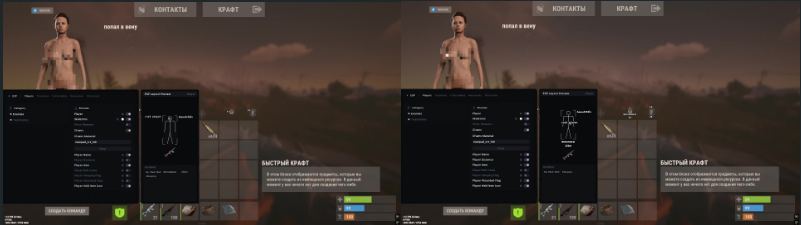
System Requirements
Additional Requirements: Enable virtualization in BIOS
Built-in spoofer: No
Bypass OBS write: No
Supported game modes: Frameless, Windowed
Supported processors: Intel and AMD
Supported Windows systems: 10x64, versions (2004 / 20H2 / 21H1 / 21H2 / 22H2), Windows 11 (21H2 -26H1)
-----------------------------
ESP PLAYERS ARE ENEMIES
Turning on
Name
Distance
Object in hands
Items in the belt
Sleep Flag
Flag of injury
Icon of an item in hands
Show of the sleeping
Chams
Chams Material
SKELETONS OF ENEMY
Turning on
Color
Outline
Skeleton thickness
Stroke thickness
BOX ESP ENEMIES
Turning on
Draw distance
Draw a box
Box type
Length of angle X
Length of angle Y
Colorization
Color
Outline
Thickness
Rounding
LABEL ESP ENEMIES
Name
Distance
Object in hands
Items in the belt
Sleep Flag
Flag of injury
Colorization
Color
Text scale
Minimum text size
Maximum text size
Zoom distance
Text size
Transformation
Outline
Anchor
X offset
Y offset
IMAGE ESP OF ENEMIES
Item icon
Color
Anchor
Icon scale
Minimum icon size
Maximum icon size
Zoom distance
Size
Rounding
X offset
Y offset
ESP PLAYERS - ALLIES
Turning on
Name
Distance
Object in hands
Items in the belt
Sleep Flag
Flag of injury
Icon of an item in hands
Show of the sleeping
ALLIED SKELETONS
Turning on
Color
Outline
Skeleton thickness
Stroke thickness
ESP CREATURES
Turning on
Name
Distance
CREATURES
Horse
Bear
Boar
Chicken
Stag
Wolf
Zombie
Scientist
ESP COLLECTIBLE ITEMS
Turning on
Name
Distance
COLLECTED
Hemp
Mushroom
Pumpkin
Corn
Berry
Potato
Collect Sulfur
Collect Stone
Collect Wood
Collect Metal
Dropped Item
Corpse
ESP RESOURCES
Turning on
Name
Distance
RESOURCES
Wood
Metal
Sulfur
Stone
ESP STRUCTURES
Turning on
Name
Distance
STRUCTURES
Workbench 1
Workbench 2
Workbench 3
Tool Cupboard
Large Wooden Box
Small Wooden Box
Wooden Barrel
Coffin
Barrel
Crate Basic
Crate Elite
Crate Mine
Crate Normal
Crate Food
Crate Medical
Crate Tools
Crate Underwater Advanced
Crate Underwater Basic
Airdrop
Auto Turret
Flame Turret
Gun Trap
Landmine
Bear Trap
RADAR
Turning on
Draw distance
Window type
Rounding
Size X
Size Y
Background color
Border color
Border thickness
Showing the center
Center type
Center color
Use direction
Show direction
PLAYER RADAR - ENEMIES
Turning on
Name
Distance
Object in hands
Sleep Flag
Flag of injury
Item icon
Show of the sleeping
RADAR POINT
Turning on
Draw distance
Point type
Colorization
Color
Size
RADAR LABEL
Name
Distance
Object in hands
Sleep Flag
Flag of injury
Colorization
Color
Text size
Transformation
Outline
Anchor
X offset
Y offset
RADAR IMAGE
Item icon
Color
Anchor
Size X
Size Y
Rounding
X offset
Y offset
RADAR - ALLIES
Turning on
Name
Distance
Object in hands
Sleep Flag
Flag of injury
Item icon
Show of the sleeping
CREATURE RADAR
Turning on
Name
Distance
RADAR OF COLLECTED
Turning on
Name
Distance
RESOURCE RADAR
Turning on
Name
Distance
STRUCTURE RADAR
Turning on
Name
Distance
AIMBOT
Aimbot key
Improved visibility check
Target of the wounded
The goal of scientists
Field of view
Smoothness
Randomization radius
Randomization factor
Intensity of the curve
Aimbot bone
AIMBOT VISUALIZATION – FOV
Turning on
Color
Thickness
Filling
Fill color
Outline
Stroke thickness
TARGET POSITION
Turning on
Color
Type
Circle size
Filling a circle
Fill color
Thickness
Outline
Stroke thickness
PREDICTED POSITION
Turning on
Color
Type
Circle size
Filling a circle
Fill color
Thickness
Outline
Stroke thickness
COMBAT FUNCTIONS
Always automatic mode
Recoil scale X
Y-scale return
Scatter scale
EXPLOSIVES
Bullet thickness
The meaning of bullet thickness
Instant Eoka
Instant Onion
Long melee attack
Removing layers
GENERAL
Language (English, Russian)
Vertical synchronization
Snow on the menu
Blurred menu background
Overlay priority
Bypass recording
FULL VERSION
1 day 4$ -
BUY7 days 20$ -
BUY
30 days 45$ -
BUY
---------------------------------------------------------------
Rampart
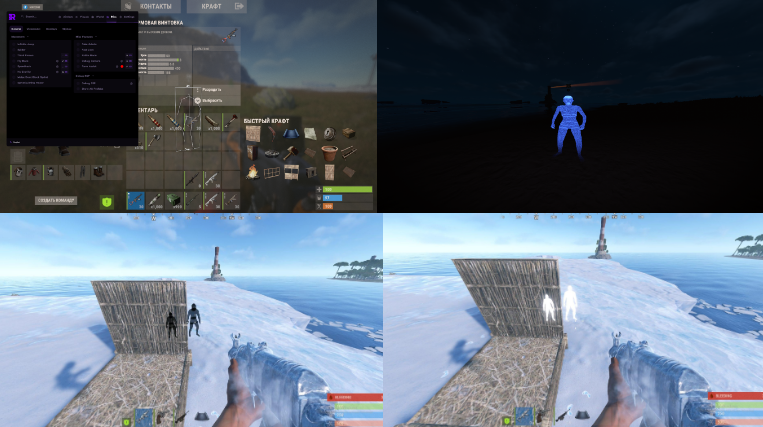
System Requirements
Windows 10 PRO | 11 PRO (2004/20h2 to 25h2)
INTEL / AMD support
UEFI BIOS mode
Hyper-V enabled
Recommended*: TPM + Secure Boot + HVCI disabled
-----------------------------
ФУНКЦИИ FULL
AIM
Aimbot
Silent Aim
Silent On Key toggle
Prediction
Prediction On/Off toggle
Lock Target (hold key)
Custom Aim Key bind
Adjustable FOV
Adjustable Smoothness
Adjustable Max Distance
Hitbox: Head / Chest / Pelvis / Legs
Filters: Ignore Sleepers / NPC / Teammates
AIM VISUALS
FOV Circle
Aiming Line
Predicted Position Marker
WEAPON
No Recoil
No Spread
Always Shoot
Auto Semi
Instant Bow
Instant Compound Bow
Instant Eoka
PLAYER ESP
Boxes: 2D / 3D / Corner
Skeleton
View Direction Line
Name
Distance
Held Item
Team ID
Belt Items
Clothing Items
Chams
Separate colors for: Teammates / Wounded / Sleepers / Bots
Separate bot distance
RADAR
Minimap (circle or square)
Adjustable: Size / Scale / Position (corner select + offset)
Background color
Player dots (color, size)
View Zone cone (color)
Grid Lines (thickness, opacity, color)
Tick Marks (thickness, opacity, color)
Show: Teammates / NPCs / Distance / Names
Show: World items / Farm / AI on radar
WORLD ESP
Tool Cupboard (+ upkeep display)
Sleeping Bags
Workbench Tier 1 / 2 / 3
Dropped Items (filter: Weapons / Tools / Food / Resources / Ammo / Clothing / Components / Other)
Corpses
Backpacks
Storage Boxes
RF Receiver / Broadcaster
Motion Sensor
Raid ESP (+ timer)
Individual distance per category
TRAPS ESP
Auto Turret
Shotgun Trap
SAM Site
Landmine
Flame Turret
Snap Trap (Bear Trap)
Can Alarm
NPC Turret
Trap Status / Health display
Individual distance per trap type
VEHICLE ESP
Minicopter / Scrap Heli / Attack Heli
Bicycle / Motorbike / Snowmobile
Modular Car / Horse
Rowboat / RHIB / Tugboat
Submarine / Diver Propulsion
Drone
Individual distance + color per vehicle
FARM ESP
Ores: Sulfur / Metal / Stone
Trees / Wood
Collectibles: Hemp / Metal / Stone / Wood / Sulfur
Diesel Barrels / Berries / Roses
Crates: Elite / Military / Tools / Normal / Barrels
Food: Corn / Mushroom / Pumpkin / Potato / Food Crate
Airdrop
Chinook Crate (+ locked timer)
Individual distance + color per item
ANIMALS ESP
Horse / Bear / Polar Bear / Boar / Stag / Wolf / Shark / Chicken
VISUAL
Custom Crosshair (multiple types, color)
Hotbar Widget (on-screen)
Armor Widget (on-screen)
No Weapon Animation
Bright Night / Ambient
Local Player Chams
Remove Layers (bind)
MISC
Fast Loot
Spider (+no fall damage)
Third Person (bind)
Admin Camera (bind)
SETTINGS
Config Save / Load
Menu toggle (bind)
Watermark (FPS, time)
Custom ESP font
-------------------------------
ФУНКЦИИ LITE
chams f4
memory aim f5
bright night f6
black chams -
white chams +
aim to head caps+0
aim to torso caps+9
FULL VERSION
1 day 6$ -
BUY7 days 29$ -
BUY
30 days 60$ -
BUY
LITE VERSION
1 day 2$ -
BUY7 days 10$ -
BUY
30 days 21$ -
BUY
---------------------------------------------------------------
Renthal

System requirements
Additional requirements: Flash drive, UEFI BIOS, enable Hyper-V
Bypass write to OBS: No
Supported game modes: Windowed, frameless
Supported processors: Intel & AMD
Supported systems: Windows 10 PRO, Windows 11 PRO
-----------------------------
Aimbot (Full version only)
Player ESP General
Enable Player ESP
Visibility check
Display distance
ESP Preview
Player Name
Include names
Color of the name
The color of the name is out of sight
Player Distance
Text of the distance
Distance color
Color of distance out of sight
Boxes
Enable boxes
Box type
Full box
Filled box
Box color
The color of the box is not visible
Fill color
Fill color is not visible
Skeleton
Enable skeleton
Skeleton color
The color of the skeleton is out of sight
Player States
Teammates
Teammate color
Sleeping
The color of the sleeping
The wounded
The color of the wounded
Team ID
Enable Team ID
Team ID Color
Team ID color is not visible
Held Item Text
Enable text for the item in hand
Item text color
Text color of an item that is not visible
Held Item Icon
Enable item icon
Item icon color
The color of the item icon when it is not visible
View Direction
Enable gaze direction
Length of the line of sight
Line of sight color
Line of sight color out of sight
Chams
Type of hand chams
Type of chams for weapons
Misc
Without recoil
Debug camera
Changing FOV
Time change
Aspect ratio
Player ESP General
Enable Player ESP
Player ESP Visible Check
Player ESP Distance
ESP Preview
Player Name
Player ESP Names
Player Name Color
Player Name Color Invis
Player Distance
Player ESP Distance Text
Player Distance Color
Player Distance Color Invis
Boxes
Player ESP Boxes
Player Box Type
Full Box
Player Fill Box
Player Box Color
Player Box Color Invis
Player Fill Color
Player Fill Color Invis
Skeleton
Player ESP Skeleton
Player Skeleton Color
Player Skeleton Color Invis
Player States
Player ESP Teammates
Player Teammates Color
Player ESP Sleepers
Player Sleepers Color
Player ESP Wounded
Player Wounded Color
Team ID
Player ESP Team ID
Player Team ID Color
Player Team ID Color Invis
Held Item Text
Player ESP Held Item Text
Player Held Item Text Color
Player Held Item Text Color Invis
Held Item Icon
Player ESP Held Item Icon
Player Held Item Icon Color
Player Held Item Icon Color Invis
View Direction
Player ESP View Direction
View Direction Length
View Direction Color
View Direction Color Invis
Chams
Hand Chams Type
Weapon Chams Type
MISC
No recoil
Debug Camera
Fov Changer
Change TimeAspect Ratio
FULL VERSION
1 day 5$ -
BUY7 day 20$ -
BUY
30 day 40$ -
BUY
LITE VERSION
1 day 3$ -
BUY7 day 13$ -
BUY
30 day 25$ -
BUY
---------------------------------------------------------------
Enot

PROCESSORS : INTEL / AMD
SUPPORTED OS : Windows 10 / Windows 11
SUPPORTED OS VERSIONS : Windows 10 (1903+) / Windows 11 Any
GAME MODE : Frameless
-----------------------------
No Recoil
No Spread
Chams
Box
Names
Crosshair
FOV Changer
Remove layers (on maintence)
FULL VERSION
1 day 3$ -
BUY7 day 13$ -
BUY
30 day 25$ -
BUY
---------------------------------------------------------------
COVCHEG

Steam
Processor: Intel / AMD
System: Windows 10/11
Windowed Mode: Any
Built-in Spoofer: None
USB Flash Drive: Not Required
-----------------------------
Distance - display the distance to targets in meters
Max Distance - limit the range of WH
Ignore Sleepers - do not show sleeping
Quick Slots - show items in quick slots for players
Draw Player Type - show the type of target (player / npc, etc.)
Ignore Scientist - disable the display of scientists (NPC)
Team ID - show the IDs of player teams
Ignore Team - do not show your team
Chams - WH in the form of Chams on Players
AIM
Active - enable aimbot in the COVCHEG cheat for RUST (vector aim)
Silent AIM - aimbot type, bullets hit the target, but the sight does not move
FOV - the size of the target capture area by the aimbot
Draw FOV - show the FOV circle of the aim on the screen
Smooth - smoothness of aim movements (higher the value, the weaker the aim)
Aim Distance - the range of Aimbot
Bone Body / Force Head - by default, AIM aims at the body, if you put Force Head - at the head
Remove Sway & Recoil - disable shaking / swaying of the weapon and Recoil when shooting
Aim Key - key to activate aim (hold)
Visible Check - aim will only work on visible targets
Prediction - predict the trajectory of the shot when aiming
Loot
Item ESP - enable ESP to display items
Only Collectable - show only those items that can be looted
Ores (Metal, Sulfur, Stone) - display ores (metal, sulfur, stone)
Wood - display wood reserves
Stash - show stashes
Crates (Medical, Food, Tool, Elite) - the ability to see the location of cases (medical, food, tools, elite)
Minicopter - mini-helicopter
Backpack - backpacks
Max Distance - operating range of Loot ESP
MISC
Instant EOKA - instant shot from a homemade gun
FOV Changer - increase the field of view
Zoom Key - key to enable zoom hack
Remove Construction - allows you to see through player bases
Bright Night - a beautiful and bright night mode in Rust
Config
Language - menu language
Menu key - button to open / close the
Config menu Slot - config slot
Menu Scale - menu size
ESP font size - font size
Save - save config
Load - load config
Unload cheat - unload cheat (completely disable cheat)
Loot
FULL VERSION
1 day 4$ -
BUY7 days 13$ -
BUY
30 days 27$ -
BUY
---------------------------------------------------------------
CourierScript

Windows 10–11 up to and including 23H2
Processors: Intel / AMD
USB flash drive
TPM: all options (on/off)
Secure Boot: All options (on/off)
-----------------------------
Player ESP
Chams up to 300 meters
Sleeping ESP
Chams up to 200 meters
Settings
Unload - END key
FULL VERSION
12 hours 1$ -
BUY3 days 6$ -
BUY
---------------------------------------------------------------
Morphine

Windows Settings:
Enable Hyper-V in Windows Features
Windows 10 / Windows 11
BIOS Settings:
Enable UEFI in BIOS
Disable SecureBoot in BIOS
Disable TPM 2.0 in BIOS
Enable Virtualization in BIOS
-----------------------------
Aim
Enable
Visible Check
Silent
Target NPC
Smooth
Hitchance
FOV
Draw FOV
Line to Target
Aim Bone
Hitbox Override
Override Bone
Weapon
Recoil Compensation
No Recoil
No Spread
Shotgun No Spread
Fast Bullet
Rapid Fire
Fat Bullet
Always Shoot
Instant Eoka
Instant Bow
Instant Compound
Visual
Player ESP Enable
Visible Check
Distance
Sleepers
Wounded
Draw Indicators
Draw on Map
Draw on Radar
Player Chams
Boxes
Skeleton
Health Bar
Nickname
Distance Tag
Team ID
Flags
Held Item
Item Icon
Sleeping Bag
Cupboards
Workbenches
Gun Trap
Turret
Sam Site
Flame Turret
Land Mine
Corpses
Backpacks
Dropped Items
Mini Copter
Scrap Heli
Bicycle
Motor Bike
Horse
Boat
Sulfur
Metal
Stone
Hemp
Crates
Raid ESP
Animals
Bradley
Chinook
Patrol Heli
HUD
Copy Steam Link
Clothes
Hotbar
Hitmarkers
Rocket Helper
Local Bullet Tracer
World Bullet Tracer
Radar Bullets
Reload Bar
Raycasting
Hand Chams
Gun Chams
Bind Island
Watermark
FPS Counter
Server Info
Radar
Miscellaneous
Infinity Jump
Spider
Always Sprint
Fast Loot
Instant Revive
Loot Tied Crates
Silent Melee
Silent Farm
Drop All Items
No Weapon Bob
No Weapon Lower
No Weapon Animation
Battle Mode
Change Hand Position
Remove Layers
Debug Camera
Third Person
Zoom
FOV Changer
Aspect Ratio
Bright Ambient
Fog Color
Sky Color
Change Clouds
Change Stars
Change Time
Change Atmosphere
Change Weather
FULL VERSION
1 day 5$ -
BUY7 day 25$ -
BUY
30 day 50$ -
BUY
---------------------------------------------------------------
Kali

Game client: STEAM
Supported processors: Intel and AMD
OS: Windows 10, 11
Spoofer: None
Anti-cheat: EAC
-----------------------------
Combat:
- No Recoil: Disables recoil when firing.
- Recoil Level: Adjusts the recoil strength (from 0% to 100%).
Visuals:
- ESP Enabled: Enables general backlighting.
- Crosshair: Static crosshair in the center of the screen.
- Visible Check: Checks player visibility (changes color if the player is visible).
- Skeleton: Displays player skeletons.
- Nickname: Displays player names.
- Distance: Distance to players and objects.
- Weapon: Displays the active weapon in the player's hands.
- NPC ESP: Displays scientists and other NPCs.
- Prefab ESP: Displays game objects (prefabs).
- Sleepers: Displays sleeping players.
Resources:
- Hemp: Hemp.
- Sulfur Ore: Sulfur ore.
- Metal Ore: Metal ore.
- Stone Ore: Stone ore.
Containers / Loot:
- Box/Normal Crate: Normal boxes.
- Elite Crate: Elite boxes.
- Military Crate: Military boxes.
- Corpse: Player and NPC corpses.
- Workbench: Workbenches (1, 2, 3 levels).
- Large Box: Large storage boxes.
- Weapons: Dropped weapons.
- Cards: Access cards (blue, green, red).
- Blueprints: Blueprints.
Traps and defenses:
- Gun Trap: Shotgun trap.
- Auto Turret: Auto-turret.
- Flame Turret: Flamethrower turret.
- Landmine: Mines.
- Bear Trap: Bear traps.
- SAM Site: Anti-aircraft guns.
- Tesla Coil: Tesla coils.
Vehicles:
- Minicopter: Minicopters.
- Scrap Helicopter: Cargo helicopters.
- Attack Helicopter: Attack helicopters.
- Hot Air Balloon: Hot air balloons.
- Horse: Horses.
- Boat: Boats.
- Patrol Heli: Patrol helicopter.
Animals:
- Boar: Boar.
- Bear: Bear.
- Wolf: Wolf.
- Snake: Snake.
- Crocodile: Crocodile.
- Tiger: Tiger.
- Panther: Panther.
- Chicken: Chicken.
- Shark: Shark.
Misc:
- Always Day: Always daylight (day).
- Disable Grass: Disable grass rendering to improve FPS and visibility.
- Disable Buildings: Disable rendering of buildings (use with caution).
- Spider-Man: Ability to climb walls.
- Doors: Illuminated doors.
FULL VERSION
1 day 5$ -
BUY7 days 22$ -
BUY
30 days 42$ -
BUY
---------------------------------------------------------------
EON

Undetected & Stable – Battle-tested every update with kernel-level protection.
Windows 10 & 11 (25H2) Compatible – Supports most Windows builds.
-----------------------------
Enable / Disable
Aim Key (LClick, RClick, Side Buttons, Shift, Alt, Tab, Capslock)
Aim Type (Memory / Silent / Kernel)
Target Selection (Head / Body / Closest)
Smoothness Control (1–50)
Prediction System
Hitchance % (Silent Only)
Ignore Sleepers / Wounded / Team / Scientists
Max Distance (10–300)
FOV Size (1–360)
FOV Circle (Outlined / Filled)
Aimline
VISUALS
Enable / Disable
Box ESP (Normal / Cornered / Rounded)
Filled Box
Skeleton
Head Circle + Adjustable Size
Distance
Name
Held Item
Flags (Sleeping / Down / Safe Zone / Admin)
Healthbar
Ignore Filters (Sleepers / Ghosts / Scientists / Team)
Max Render Distance (10–300)
WORLD
Enable/Disable
Distance Display
Player & Scientist Corpses
Resources (Stone/Metal/ Sulfur / Hemp)
Loot (Crates / Recycler)
Pickups (Wood / Stone / Metal / Sulfur)
Custom Render Distances:
• Ores & Pickups (50–500)
• Dropped Items (50–1000)
• Other Objects (50–500)
Bear / Wolf / Boar / Deer
Horse / Chicken / Snake / Shark
Healthbar Display
Fully Customizable Colors:
• Box / Filled Box / Skeleton
• Head Circle / Distance / Name / Item
• Flags
Aimbot Visuals:
• FOV Circle / Filled FOV / Aimline
EXPLOITS
Automatic Weapons
Instant Eoka + Chance % Control
Rapid Fire + Adjustable Speed
No Lower / No Bob / No Sway
Recoil Control (X/Y %)
Spread Control (%)
Infinite Jump
Spiderman Movement
No Fall Damage
Heavy Aiming
Third Person View
Jesus (Walk on Water)
Fly Mode + Keybind
Adjustable Fly Speed (1–20)
MISCELLANEOUS
Watermark Toggle
VSync
Battle Mode
Menu Accent Color
Quick Exit
CONFIG
7 Config Slots
Save / Load Configurations
Display Active Config Name
FULL VERSION
1 day 4$ -
BUY7 days 15$ -
BUY
30 days 30$ -
BUY
---------------------------------------------------------------
Fury

Powered by Steam
Supports all Intel & AMD CPUs
Supports all versions of Windows 10/11
-----------------------------
Players
Box
Name
Distance
Skeleton
Arrows - arrow pointing to players outside your field of view
Inventory
Corpses
Sleepers
NPC ESP
NPC
Arrows - arrow pointing to NPCs outside your field of view
Buildings ESP
Cupboard
Large Box
Small Box
Sleeping Bag
Small Stash
Traps ESP
Turret
Gun Trap
Flame Turret
Landmine
Loot ESP
Drops
Hemp
Tool Box
Loot Box
Military Crate
Elite Crate
Supply Drop
Hackable Crate
Ore ESP
Stone
Metal
Sulfur
Animals ESP
Bear
Polar Bear
Wolf
Boar
Horse
Chicken
Crocodile
Panther
Vehicle ESP
Minicopter
Scrap Heli
Boat
RHIB
ESP Settings
ESP Color Settings
ESP Distance Settings
Show on Radar
Radar
Custom Size
Custom Range
Show Only Selected Entity
Misc
Crosshair
Show Inventory FOV
FULL VERSION
1 day 6$ -
BUY7 days 20$ -
BUY
30 days 46$ -
BUY
---------------------------------------------------------------
EUPHON

System Requirements
: Bypass OBS recording: No;
Built-in spoofer: No;
Anti-cheat: Vanguard;
Supported game modes: All;
Supported processors: Intel and AMD;
Supported systems: Windows 10 & 11 (20H2-25H2)
-----------------------------
AIMBOT
Enable
Silent Aim [Hold] — Bullets fly at the target without aiming.
Visible Check
Recoil Control (RCS)
Draw FOV — Display the working radius
Smooth & FOV customization — Adjusting smoothness and radius
Bone selection — Bone selection (Head/Neck/Chest)
Customizable keybinds — Changing buttons
VISUAL
Chams - Chams
2D/3D Box ESP - Squares (2D and 3D)
Skeleton & Head ESP — Skeletons and head lighting
Health Bar & Weapon Info — Health and weapons in hand
Agent Icon
SpikeInfo — Spike Info
MISC
Unlock ALL — Skinchanger (All skins unlocked)
Bunny Hop
View Model & FOV Changer — Change the viewing angle and hand position
Material customization (Chams) — A variety of color/material customization for characters and weapons
ThirdPerson mode - 3rd person view
Spin Bot — Spinner (Rage)
Skip Tutorial - Skip Tutorial
FULL VERSION
1 day 4$ -
BUY7 days 27$ -
BUY
30 days 48$ -
BUY
---------------------------------------------------------------
SMG CHAMS++

Specifications:
Processor: Intel & AMD
Video card: Nvidia & AMD
Operating system: Windows 10 (all versions) / Windows 11 (all versions)
Game mode: Any
-----------------------------
Chams - glow flat wireframe
Visible check
Team check
Npc
Bots
Animals
Traps
Show ore
Show collect ore
Show traps
Show sleeping bags
Show animals
Show storages
Show vehicle
Show helicopters
FULL VERSION
1 day 5$ -
BUY7 days 19$ -
BUY
30 days 40$ -
BUY
---------------------------------------------------------------
SRX

CPUINTEL / AMD
OSWindows 10 / 11
LauncherSteam / Epic (Aquatica & Pre-Aquatica)
Anti-CheatEAC
Stream ModeOBS Proof
-----------------------------
Aimbot & ESP
No Recoil
Radar Hack
Undetected
FULL VERSION
1 day 5$ -
BUY7 days 10$ -
BUY
30 days 40$ -
BUY
---------------------------------------------------------------
WEB Radar

System requirements
Windows 10/11 (x64)
Steam version of the game
Disabled antivirus
Processor: Intel/AMD
Anti-cheat: EAC
Window mode: Windowless, Frameless
-----------------------------
Shows active and sleeping players
Displays nicknames and distance to the player
Allows you to customize colors for different statuses
Gives you a choice of display distance
Share the radar with friends
Open on your phone or second monitor
FULL VERSION
12 hours 2$ -
BUY3 days 8$ -
BUY
---------------------------------------------------------------
Limitless DMA

System requirements
Built-in spoofer: No
Bypass recording in OBS: Present
Supported game modes: Windowed, Frameless, Fullscreen
Supported processors: Intel and AMD
Supported systems: Windows 10, 11
Supported DMA cards: StandardDMA (which is sold on our website), LeetDMA, EnigmaDMA, SquirrelDMA, ScreamerR03, ScreamerR04, CaptainDMA, ScarletDMA, RaptorDMA, TerminatorDMA
Additional requirements: A second computer or laptop is required (minimum system requirements are 4GB of RAM and 2 cores), a DMA card and firmware for the DMA card are required
-----------------------------
ESP players
Boxes
Painted boxes
Skeleton
Health bar
Name
Distance
Object in hands
Weapon
Display command
Sleeping players
Belt of Items
Cloth
Visible player color
Hidden player color
Setting up boxes
Line thickness
Font
Distance limit
Cull settings
Animal ESP
Bear
Wolf
Boar
Chicken
Shark
Horse
Deer
Polar bear
ESP transport
Patrol Helicopter
Bradley
Scrap Helicopter
MiniCopter
Attack MiniCopter
Train
Car
TugBoat
RowBoat
RHIB
SnowMobile
Small submarine
Large submarine
Pedal Bike
Motorbike
Motorcycle with a sidecar
ESP of the world
Ore
Stone
Metal
Sulfur
Resources
Tree
Hemp
Pumpkin
Corn
Mushrooms
Potato
Berries
Diesel
Objectives of a metal detector
Ore items
Discarded items
Weapon
Tools
Armor
Medicine
Resources
Food
Explosives
Cartridges
Components
Other
Loot
Barrels
Boxes
Airdrops
Corpses
Minecart
Toolbox
Underwater boxes
Helicopter Crates
Bradley Crates
Tech Crates
Timed Crates
Buildings
Cache
Sleeping bag
Mine
Bear trap
Shotgun trap
Auto turret
Fire Turret
SAM Site
Closet
Garden bed
Big box
Workbench
Bake
Oil refiner
Recycler
Battery
Radar
Game Radar
Web radar
Sharing web radar
Radar centering button
Radar zoom
Setting up web radar updates
Map size
Seed Override
Radar support
Players
Friends
Scientists
Animals
Transport
Ore
Resources
Discarded items
Loot
Buildings
Radar Settings
Name
Distance
Height
Icon style
Size
Colors
Maximum distance
Maximum height
Aimbot
Targeting players
Targeting scientists
Targeting the wounded
Targeting the sleeping
Targeting the Bradley
Helicopter targeting
Aim button
Selecting a bone
FOV
Priority of goals
Sticky Aim
Retarget
Drawing the target
FOV rendering
Hover only over visible objects
Guidance through a shoot
Adaptive Aimbot Curve
Humanization modes
Prediction
Hit Override
Smoothness and prediction
XY setup
Types of smoothness
Smoothness of projectiles
Motion predictor
Setting Sample Size
Prediction Modifier
Local Player Prediction
Device support
KMBox
Setting up Network COM
Ferrum
Makcu
Automatic connection of devices
Weapon
No Recoil
Recoil settings
Recoil off button
No Sway
Setting up Sway
No Aim Cone
Setting up the spread
Instant Eoka
Eoka animation skipping
No Spread
Bullet speed modifier
ADS with Heavy Plate
Thick Bullet
Visual
Changing FOV
Clear water
Bright night
Bright Cave
ADS Blocking
Custom sight
Zoom
Target Hotbar HUD
Target Team HUD
Target Clothes HUD
World HUD
Icon mode
Customizing HUD Colors
Setting the interface position
Miscellaneous
PhysX Visibility Check
Checking the visibility of bones
Classification of lumbago
Spiderman
Fullbright
Bright Cave
Debug Camera
Mounted Long Neck
FULL VERSION
1 day 10$ -
BUY7 days 24$ -
BUY
30 days 36$ -
BUY
---------------------------------------------------------------
Specter

System requirements:
Processor with virtualization support (AMD/INTEL)
Virtualization enabled in BIOS
Windows 10/11 21H2 - 26H2
-----------------------------
FULL VERSION
1 day 2$ -
BUY7 days 10$ -
BUY
30 days 21$ -
BUY
---------------------------------------------------------------
Xernel

System requirements
Built-in spoofer: No
Bypass recording in OBS: No
Supported game modes: Frameless, Windowed, Full screen
Supported processors: Intel and AMD
Supported systems: Windows: 10x64, versions (2004 / 20H2 / 21H1 / 21H2 / 22H2), Windows 11 (21H2 -26H1)
-----------------------------
ESP Players & Bots
Player ESP
Bot ESP (Scientists, Bandits, Dwellers)
Sleeper ESP
Box ESP (2D Rect, 3D Wire, Corner, Rounded)
Box Fill & Opacity
Rainbow Mode (RGB Box)
Skeleton ESP
Health Bar & HP Text
Name & Distance
Snaplines
ESP Max Distance
ESP Animals
Bear ESP
Boar ESP
Wolf ESP
Stag ESP
Horse ESP
Chicken ESP
Animal Name & Distance
ESP Objects & Deployables
Ores ESP (Stone, Sulfur, Metal)
Plants ESP (Hemp, Food, Collectables)
Containers ESP (Crates, Barrels, Airdrops, Stashes, Corpses, Dropped Items)
Vehicles ESP
Deployables ESP (Tool Cupboards, Sleeping Bags)
Advanced Loot Filter
Interactive Item Search
Smart Categories (Weapons, Ammo, Components, Resources, etc.)
High Priority Item Override
Individual Item Snaplines
Custom Item Colors & Icon Scaling
Misc & Visuals
Battle Mode (Clutter-free ESP during fights)
Inventory Viewer (View targets' inventory in radius)
Player Counter
Custom Crosshair (Cross, Dot, Circle, Cross + Dot)
FOV Circle (Adjustable Radius, Thickness, Fill)
2D Radar
Customizable Radar Window
Rotate With Player
Entity Filters (Players, Bots, Animals, Loot, Objects, Sleepers)
Custom Dot Sizes (Self & Entities)
Radar Styling (Grid, Rings, North Indicator, Opacity, Colors)
AIMBOT
Key bind (Hold/Toggle)
Fov
Smooth
Bone choose
No recoil 0-100%
FULL VERSION
1 day 5$ -
BUY7 days 15$ -
BUY
30 days 36$ -
BUY
---------------------------------------------------------------
Fsociety
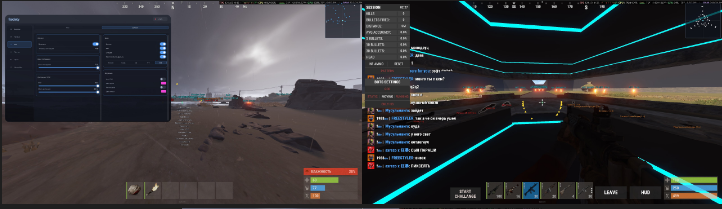
System requirements
Game Client: Steam
Processor: Intel / AMD
System: Windows 10 / 11 x64 - up to build 26200.8037 Window
Mode: Windowed / Frameless
USB Flash Drive: Not required
-----------------------------
Visuals / ESP
Players — box, skeleton, name (RU/EN), distance, snapline, weapons, sleeping/wounded/corpses
Skeleton Thickness — thickness of skeleton lines
Chams — 15 types of model lighting
NPC — scientists, heavy scientists, peacekeepers, bandits, tunnel and underwater dwellers
Animals — bears, wolves, wild boars, tigers, sharks, etc.
Loot — 13 categories: weapons, ammunition, modules, armor, medicine, tools, explosives.
Collectables — plants, mushrooms, natural resources, and other collectible items.
Chests — military, elite, hackable (15 min), Heli, Bradley, supply drop, dropped bag.
Buildings — TC, sleeping bags, auto‑turrets, SAM, traps, workbenches, furnaces, recycler.
Raid Explosive — C4 / satchel / rocket / explo-cartridges attached to structures
Events — Bradley, patrol helicopter, CH47, cargo ship, drop
Vehicles — mini/scrap/attack heli, vehicles, boats, submarine
Resources — sulfur, metal, HQM, stone, hemp
Waypoints — custom points on the world and map (base, warehouse, exits)
OOF Arrows — arrows at the edges of the screen for off‑screen players
Show Inventory — displays the inventory of players and NPCs
Aim
Targets — players and/or NPCs, selectable points: head / chest / pelvis / head+chest / nearest
Silent Aim — hitting a target without an apparent camera rotation
Prediction — lead for moving targets and bullets with travel time
FOV — adjustable field of view in degrees + visual circle
Smoothness — smoothness of aiming
Max Distance — local distance limit
Target Line — line from the sight to the target
Misc & Settings
No Recoil — disables weapon recoil
No Spread — disables bullet spread
No Sway — disables sight sway
FOV Changer — custom game FOV above the movement limit
Zoom Key + Zoom FOV — a zoom key with a customizable FOV (zooming via hold-key)
Bright Night — brightening the night with brightness adjustment
Crosshair — a custom crosshair (Cross / Dot / Circle / T / Plus+Dot), size, thickness, color
2D Radar — a mini-radar with a customizable radius
Preview — a drag-and-drop ESP layout, preview of all states (Alive/Sleeping/Dead/Teammate)
Profiles — up to 5 named configs: Save / Load / Reset / Delete
Hotkeys — Menu, Unload, Hide Overlay, Fight Mode
Anti-Stream — hiding from screen capture and hiding in videos
Languages — Russian / English interface
FULL VERSION
1 day 3$ -
BUY7 days 18$ -
BUY
30 days 36$ -
BUY
---------------------------------------------------------------
EWERVARE DMA

System requirements
Supported DMA cards: StandardDMA (which is sold on our website), LeetDMA, EnigmaDMA, SquirrelDMA, ScreamerR03, ScreamerR04, CaptainDMA, ScarletDMA, RaptorDMA, TerminatorDMA
Additional requirements: A second computer or laptop is required (minimum system requirements are 4GB of RAM and 2 cores), a DMA card and firmware for the DMA card are required.
Built-in spoofer: No
Anticheat:EAC
Bypass recording in OBS: Present
Supported game modes: Windowed, Frameless, Fullscreen
Supported processors: Intel and AMD
Supported systems: Windows 10, 11
-----------------------------
Aimbot
KMbox
Aunt
Silent
Vector
Max distance
FOV
Draw FOV
Draw line to target
Stick to target
Retarget delay
Movement prediction
Local player movement prediction
Bone selector
Vischeck
NPC included
Weapon
Recoil x %
Recoil y %
Spread %
Iron sight zoom
No sway %
Thick bullet %
Players ESP
Font size
Text color
Show name
Show distance
Show team id
Max distance
Show sleepers
Box ESP
Skeleton ESP
Skeleton color
Skeleton thickness
Full belt ESP
Chams
Vischeck
Everything can be overridden for teammates
Objects ESP
Show all
Show name
Show distance
Max distance
Font size
Customizable objects selector
NPC skeleton
Loot ESP
Show/hide every category of items with unique color for each of them.
Web radar
Enable players
Enable players belt
Customizable objects selector
Show/hide every category of items with unique color for each of them.
Misc
Bright nights
Time changer
Settings
Safe mode
VSync on/off
Fps limit
Config system
FULL VERSION
1 day 7$ -
BUY7 days 15$ -
BUY
Forever 250$ -
BUY
---------------------------------------------------------------
Hydra

Windows 10/11 all versions,
hyper-v enabled,
disabled secure boot,
The disk format must be GPT, MBR is not supported, the processor is Intel AMD
-----------------------------
Wallhack (WH) - see all players and NPCs through walls
Aimbot – precise aiming with smooth tracking and flexible settings
Box ESP + Skeleton – frames and skeletons of opponents
Name, Distance, Weapon ESP — complete information about enemies
Team ID + Colored Flags — Teammates, Wounded, Sleepers, OOF
Radar is a convenient mini-map displaying all targets.
NPC ESP — separate highlighting for bots
Adjustable display distances (up to 250+ meters)
FULL VERSION
1 day 5$ -
BUY7 days 20$ -
BUY
30 days 40$ -
BUY
---------------------------------------------------------------
Mydrid

System Requirements: Built-in spoofer: No
Additional requirements: Enable virtualization, Hyper-v, UEFI Bios, disable Secure Boot
Bypass recording in OBS: No
Supported game modes: Windowed, Frameless
Supported processors: Intel & AMD
Supported systems: Windows 10, Windows 11
-----------------------------
Aimbot
Enable aimbot
Hold for aim
Visibility check
Silent aimbot
Chance to hit
Smoothness
FOV radius
Weapon modifications
Without recoil
Without scatter
No shotgun spread
Automatic fire mode
Rapid Fire
Fast Bullet
Enlarged bullet
Combat functions
Always shoot
Instant Eoka
Instant Onion
Instant Compound Bow
ESP
Enable ESP
Display distance
Visibility Preview
Checking the direction of gaze
Skeleton
ESP players
Players
Allies
Sleeping players
Injured players
Boxes
Type of boxes
Line thickness
Information
Name
Distance
Object in hands
Team ID
Chams
Players' hours
Player's body
Hands
Weapon
Hotbar mode
ESP colors
Color of boxes
Visible box color
Color of the hidden box
Visible fill color
Hidden fill color
Skeleton color
Visible skeleton color
Hidden Skeleton Color
Information color
Visible Name Color
Hidden Name Color
Color of visible distance
Color of hidden distance
The color of the object in the hands of the visible
The color of the object in the hands of the hidden one
Team color visible
Team color hidden
Line of sight color
Visible line of sight color
Hidden line of sight color
Radar
Turn on the radar
Radar colors
Visible player
Hidden Player
Frame color
FOV color
Tracers
Bullet tracers
RGB mode
Glow
Display time
HUD
Indicator
Information about the target
Hotbar Clothes
Looking at you
OOF indicator
Enable OOF
Radius
Size
FOV
OOF weapons
OOF visible
OOF hidden
ESP buildings
Sleeping bag
Closet
Gun Trap
Auto turret
SAM Site
Fire Turret
Mine
ESP transport
MiniCopter
Scrap Helicopter
Bicycle
Motorbike
Horse
Boat
ESP items
Workbenches
Discarded items
Weapon
Cartridges
Medicine
Explosives
Other items
Distance
Maximum distance
Corpses
Backpacks
Raid ESP
Raid ESP
ESP Farm
Sulfur
Metal
Stone
Hemp
Boxes
ESP NPC
Animals
NPC
Scientists
Bradley
Chinook
Patrol Helicopter
Miscellaneous
Infinite Jump
Spider
Constant running
Speed
Speedhack
Debug Camera
Local player
Fast loot
No weapon animation
Without lowering the weapon
No weapon swaying
Changing the aspect ratio
Changing FOV
Visual
Combat mode
Third-person view
Zoom
Aim
Turn on the sight
Hand position
World
Lighting
Vibrant surroundings
Time change
Removing layers
Changing the fog
The color of the sky
The color of the clouds
Changing Stars
General settings
Menu
Friends
HUD Preview
Display distance
RGB speed
Topic
Custom theme
Fonts
ESP font
Pixeloid Sans
Font size
Custom font
Config
Create a config
Refresh the list
Upload config
Save config
Delete config
Share via clipboard
Importing config code
Paste from clipboard
FULL VERSION
1 day 4$ -
BUY7 days 19$ -
BUY
30 days 36$ -
BUY






![🤘 [Private cheats for RUST] |great assortment 🤘](https://www.elitepvpers.com/forum/iconimages/rust-trading/private-cheats-rust-great-assortment_ltr.gif)