ARCANE FOR DEADSIDE
AIMBOT • PLAYER ESP • ITEM ESP • SHARED CONFIGURATIONS
A configurable solution combining player and NPC aiming assistance, detailed visual information, extensive item filters and a complete configuration-sharing system.
INSTANT DELIVERY • STEP-BY-STEP SETUP GUIDE • CUSTOMER SUPPORT
VIEW ARCANE FOR DEADSIDE
BROWSE ALL DEADSIDE PRODUCTS
PRODUCT OVERVIEW
Arcane for Deadside combines a configurable Aimbot, detailed Player ESP, extensive Item ESP filters and additional visual settings.
The Aimbot supports player and NPC targeting with selectable bones, visibility checks, smoothness and maximum-distance controls. Item ESP includes separate filters for clothing, weapons, ammunition, consumables, resources, tools, devices and valuable objects.
Main features:
- Player and NPC Aimbot with visibility checks and selectable target bones
- Detailed Player ESP with boxes, skeletons, corpses and view-direction information
- Extensive Item ESP with multiple loot categories
- Battle Mode for a cleaner combat-focused visual layout
- Off-Screen Arrows and a static center-screen crosshair
- Shared Configuration System for saving, importing and sharing settings profiles
- Custom Interface with scaling, themes, languages and VSync
AIMBOT
Configure aiming assistance for combat against players and NPCs.
- Enable — activate the Aimbot
- Keybind — assign a custom activation key
- Aim Mode — select Hold or Always-active operating mode
- Bones — select Head, Neck, Chest or Pelvis as the target area
- Aim on NPC — enable Aimbot targeting for bots
- Visibility Check — restrict targeting based on target visibility
- Draw FOV Border — display the Aimbot operating radius
- Draw FOV Background — display a background inside the FOV circle
- FOV Size — configure the size of the Aimbot operating area
- Smoothness — adjust the smoothness of the aiming movement
- Max Distance — configure the maximum targeting distance
PLAYER ESP
Display detailed information about players and configure how each visual element appears on the screen.
- Bounding Box — select complete Box or Corner Box style
- Filled Box — fill player boxes using a Static or Gradient background
- Skeleton — display player skeletons and adjust line thickness
- Name — display player nicknames
- Corpse — display player corpses
- Distance — show the distance to players
- View Line — display the direction in which a player is looking
- Line to Enemy — draw directional lines to players
- Visibility Check — change visual information based on target visibility
- Max Distance — configure the maximum Player ESP range
ITEM ESP
Locate important equipment, supplies and resources while controlling the maximum display distance.
- Count — display the quantity of highlighted items
- Distance — display the distance to highlighted items
- Max Distance — configure the maximum Item ESP range
CLOTHING & EQUIPMENT
- Jacket — display jackets
- Vest — display protective vests
- Backpack — display backpacks
- Trousers — display trousers
- Helmet — display helmets
- Mask — display masks
- Glasses — display glasses
- Gloves — display gloves
WEAPONS & AMMUNITION
- Weapon Small — display small weapons
- Weapon Big — display large weapons
- Weapon Very Big — display very large weapons
- Weapon MF — display items from the Weapon MF category
- Ammo — display ammunition
- Missile Projectile — display missile projectiles
CONSUMABLES
- Food — display food
- Water — display water
- Medikit — display medical kits
- Medikit Material — display medical crafting materials
RESOURCES & TOOLS
- Apple — display apples
- Mussel — display mussels
- Scrap Metal — display scrap metal
- Berries — display berries
- Mushrooms — display mushrooms
- Herb — display herbs
- Material — display crafting materials
- Tool — display tools
- Construction — display construction items
- Component — display components
- Repair Kit — display repair kits
DEVICES & MISCELLANEOUS ITEMS
- Device — display devices
- Inventory Device — display inventory devices
- Convoy Case — display convoy cases
- Flask — display flasks
- Resource — display resource items
- Money — display money
- Hunting Trophy — display hunting trophies
MISCELLANEOUS FEATURES
- Battle Mode — enable a simplified combat-focused visual layout
- Crosshair — display a static center-screen crosshair
- Off-Screen Arrows — display directional indicators for players outside your current view
INTERFACE & SETTINGS
- Menu Key — assign a custom menu activation key
- Unload Key — assign a key for completely unloading the software
- DPI Scale — adjust the size of the interface and visual components
- VSync — enable vertical synchronization
- Theme — switch between Dark and Light themes
- Watermark — display or hide the Arcane watermark
- Language — select English, Russian or Chinese
CONFIGURATION SYSTEM
Create, save, import and share separate profiles for different Aimbot, ESP and interface settings.
- Create — create a new settings profile
- Get Shared — import an available shared configuration
- Launch — apply the selected configuration
- Save — save the current settings
- Edit Name — rename the selected configuration
- Share — share a configuration with other users
- Remove — delete the selected configuration
PRODUCT SCREENSHOTS
Open the spoiler below to view the live preview and Arcane interface.
LIVE PREVIEW
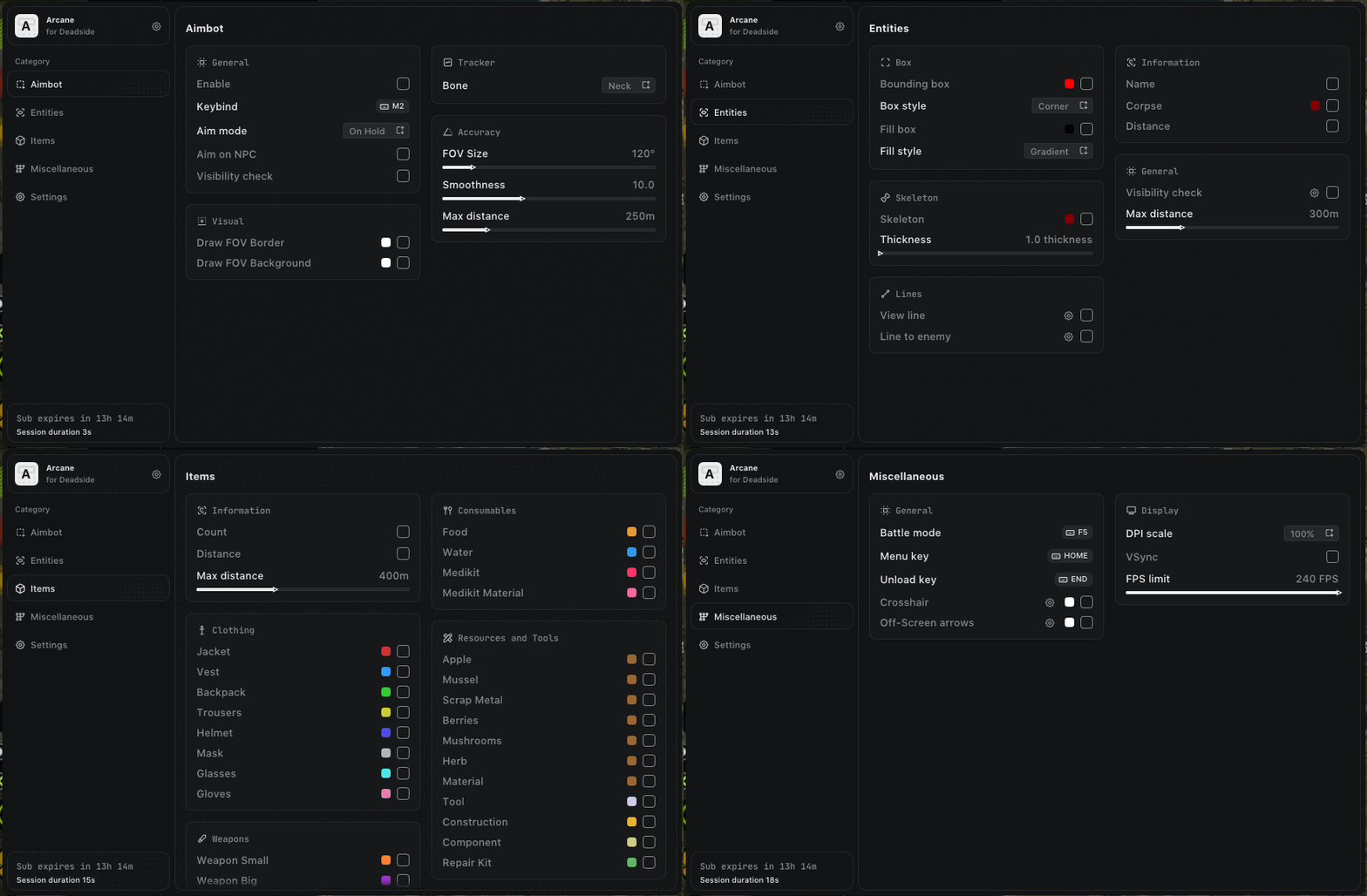 INTERFACE SCREENSHOTS
.jpg)
.jpg)
PURCHASE & DELIVERY
- Open the Arcane for Deadside product page
- Check the current product status, compatibility and system requirements
- Select the license period that fits your needs
- Complete the checkout using a valid email address
- Receive your license information automatically after payment
- Follow the included installation and activation guide
You can also view other available products in the
Deadside product catalog.
WHY CHOOSE SHOPHACKGAMES?
- Automatic digital delivery immediately after payment
- Detailed and easy-to-follow setup instructions
- Assistance with activation and initial configuration
- Customer support after purchase
- Multiple license periods for different needs
- Current product status displayed on the website
- Clear compatibility and system requirement information
Before purchasing, always check the current product status, supported game version, available license periods and system requirements on the product page.
IMPORTANT INFORMATION
Quote:
Third-party software may result in restrictions or permanent penalties being applied to your game account. No product can eliminate this risk completely. Do not use Arcane on an account you are not prepared to lose.
Activated or automatically delivered digital license keys cannot be withdrawn. Review the product description, status, compatibility and purchase terms before completing your order.
|








 Selling a working cheat for Deadside | Deadside Cheat


