Okay, so I've done the above and so far have a If and ElseIf for $box1 up to $box10 as it seems the pixelsearch either skips pixels or DO has slightly different colours for every single box. Can you specify a pixelsearch range of colours, as my script is currently like this (i created random times for wait so D.O.'s logs aint so obvious):
Having hard time detecting the color for Cargoes/Boxes/NPC's
Quote:
Originally Posted by Bone-marrow
Hello!
Since the newest updates, pixelbots have been getting more popular. I noticed that there are not many Autoit tutorials for a Darkorbit pixelbot, so I decided to make one This is my first tutorial, and I am still learning Autoit, so bear with me...
Before I begin, you should have Autoit downloaded. Have SciTE.exe and Au3Info.exe open (both can be found in the Autoit folder).
Simply click and drag the crosshairs/target to whatever you want to be collected and it will tell you the pixel color.
NOTE: Your info window must be on the "mouse" tab!
While 1

			$Box = PixelSearch(80,85,1745,1050,0xFFFFDD)
			   If IsArray($Box) Then
				  MouseMove($Box[0],$Box[1],0)
				  MouseClick("left")
				  Sleep(1750)
			   Else
				  Opt("MouseCoordMode", 1)
				  MouseMove(int(Random(1390,1580)), int(Random(805,915)), 0)
				  MouseClick("left")
				  Sleep(2000)
			   EndIf

	  WEnd
The "Else" statement tells the bot to move if no box/resource is spotted. The "Sleep(2000)" is the timing between each click on the minimap. Make sure to have "1" beside MouseCoordMode, otherwise it may not work. In this line:
After that, you have a simple yet working boxbot. To make it collect palladium, switch the pixel color and change the minimap coordinates to accomodate the fog area instead of the entire minimap. Here is the whole source:
#RequireAdmin

Global $pause = False

ProcessSetPriority("script name.exe",4) ;enter your script name in order to work

HotKeySet("{ESC}", "_quit") ;ESC to quit
HotKeySet("{F1}", "_Pause") ;F1 to pause

Opt("MouseCoordMode", 1)

While 1
	If $pause = False Then
		$Box = PixelSearch(80,85,1745,1050,0xFFFFDD)
		If IsArray($Box) Then
			MouseMove($Box[0],$Box[1],0)
			MouseClick("left")
			Sleep(1750)
		Else
			MouseMove(Random(1390,1580,1), Random(805,915,1), 0)
			MouseClick("left")
			Sleep(2000)
		EndIf
	Else
		sleep(150)
	EndIf
WEnd

Func _quit()
   Exit
EndFunc

Func _Pause()
	If $pause = True Then
		$pause = False
	ElseIf $pause = False Then
		$pause = True
	EndIf
EndFunc
Bot with other features (Timer, count of boxes collected, etc. Again, special thanks to Fluttershy)
#RequireAdmin

Global $pause = False

Global $count = 0

ProcessSetPriority("script name.exe",4)

HotKeySet("{ESC}", "_quit")
HotKeySet("{F1}", "_Pause")

Opt("MouseCoordMode", 1)
$Timer = TimerInit()
While 1
	If $pause = False Then
		$Box = PixelSearch(80,85,1745,1050,0xFFFFDD)
		If IsArray($Box) Then
			MouseMove($Box[0],$Box[1],0)
			MouseClick("left")
			Sleep(1750)
			$count = $count + 1
		Else
			MouseMove(Random(1390,1580,1), Random(805,915,1), 0)
			MouseClick("left")
			Sleep(2000)
		EndIf
	Else
		sleep(150)
	EndIf
WEnd

Func _quit()
	$Diff = TimerDiff($Timer)
	$Diff = $Diff / 1000
	MsgBox(0,"Boxes Collected","You collected ~ " & $count & " BonusBoxes " & @CRLF & "in ~ " & $Diff & " Seconds")
	Exit
EndFunc

Func _Pause()
	If $pause = True Then
		$pause = False
	ElseIf $pause = False Then
		$pause = True
	EndIf
EndFunc
Thanks to Forsaken and Dr.Toni for their tutorials and Fluttershy for adding features in the code. Feel free to pm me any questions that you have.
Hey there. First want to thank you all for such simple and clear tutorial.
I am one of those guys without any knowledge in coding and scripting but already understand how it works.
I understand that it might be a different system now, but i am curious if there's still somehow a way for the script to identify the colors of the pixels?
doing my practice on a clone DO server so i don't mess my DO acc and Au3Info doesn't seem to detect any of the colors for bonus boxes, cargoes, booties and even npc's, i know that it detects colors of bases, backgrounds even my ship.
So, is there any tricks i could do to fix that? or here's another question, would it be possible for the script to find objects by images instead of pixels?
I mean, let's just replace the phrase for PixelSearch with ImageSearch and everything else could remain the same, simple and clear.
Hey there. First want to thank you all for such simple and clear tutorial.
I am one of those guys without any knowledge in coding and scripting but already understand how it works.
I understand that it might be a different system now, but i am curious if there's still somehow a way for the script to identify the colors of the pixels?
doing my practice on a clone DO server so i don't mess my DO acc and Au3Info doesn't seem to detect any of the colors for bonus boxes, cargoes, booties and even npc's, i know that it detects colors of bases, backgrounds even my ship.
So, is there any tricks i could do to fix that?
AutoIt does detect those pixels, but the problem is that the boxes in darkorbit are gif's, so they are constantly changing which is making it hard for pixel- or imagesearch to find them.
Quote:
Originally Posted by Michael_Mazepa
or here's another question, would it be possible for the script to find objects by images instead of pixels?
I mean, let's just replace the phrase for PixelSearch with ImageSearch and everything else could remain the same, simple and clear.
Can that happen or i am just daydreaming?
Yes, there is a function called ImageSearch. You can find plenty of tutorials how to use it by using google
AutoIt does detect those pixels, but the problem is that the boxes in darkorbit are gif's, so they are constantly changing which is making it hard for pixel- or imagesearch to find them.
Yes, there is a function called ImageSearch. You can find plenty of tutorials how to use it by using google
Hey Moneypopulation, seems like you would know if this is somewhere near right or not.
So i got an extra set of codes, a script which i am not sure how to include in the main script that everyone contributed to make.
Could someone please help me understand the whole set and what else it needs or what it doesn't need and how eventually to run main script with this "function"?
Could someone please help me understand the whole set and what else it needs or what it doesn't need and how eventually to run main script with this "function"?
[TUT] How to write your own Pixelbot [AutoIT] 06/22/2017 - Coding Tutorials - 37 Replies At first you need to find the right pixel colour...
We will do it with the AutoIT Tool:
AutoIT Window Info
http://picpanda.com/images/xk1z5i2yeot12mc1zn2_th umb.png
When we found the pixel we need to add that your ship moves:
Autoit Pixelbot für Browsergame 12/05/2012 - AutoIt - 5 Replies Hy leute suche ein paar leute die lust und laune
haben mit mir einen Pixelbot für das Spiel Darkorbit zu machen.
Was ihr können müsst:
ihr solltet etwas erfahrung haben
AutoIT PixelBot Hilfe 03/01/2010 - AutoIt - 3 Replies Hey ich hätte mal ein paar Fragen...
Also wie ja oben steht brauche ich Hilfe bei einem PixelBot zum Farmen.
Der Bot soll davon unterscheiden können ob er einen Mob anvisiert hat oder nicht.
Das funktioniert bei meinem Bot folgendermaßen:
Er Scannt oben die Farbe von der HP Leiste des Monsters (Rot),wenn diese vorhaden ist dann fängt er an die Skills auszuführen und zu looten.
Wenn sie nicht vorhaden ist drückt er einfach TAB um ein Mob anzuvisieren...und...danach...naja passiert gar...









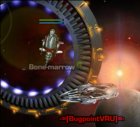
 Having hard time detecting the color for Cargoes/Boxes/NPC's
 This is my first tutorial, and I am still learning Autoit, so bear with me...
 ) use the au3info window:



 1st try