Photoshop Download And Editing guide
first off you will need a few things.
(1) Adobe Photoshop CS2
ftp://ftp.adobe.com/pub/adobe/photoshop/w...otoshop_CS2.exe
(2) this plugin wil let you view the .dds files

(3) A Thumbnail viewer, for the .dds files
<span style='color:red'>the files are compacted, you need to extract them.
<span style='font-size:14pt;line-height:100%'>download >
place them in C:\Program Files\Conquer 2.0
Extract it to your conquer folder and then run the batcher.
The text ?/ini/3dtexture.ini? should appear in the field but in case there?s nothing type the text in it and then click ?extract? button</span></span>
^thanks unknownone^
refer to this thread for wdf extraction=>
Photoshop CS2 is a 30 day trial, to get a full version you must activate it.
**Edit - Keygen removed by DM *
^ Thanks FullmetalFerret! ^
To activate this, generate a serial number (with the keygen)
click activate my photoshop (or it was somthing like that)
^it is before you fully get into photoshop^
next on photoshop it will show an activation number, enter that into your keygen and generate your auth code.
put that in photoshop, done![/color]
if you have followed the instructions you have downloaded photoshop and are ready for your first edit...
-lets make it simple shall we?
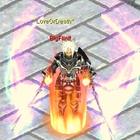
this is the finished product
that was a very simple edit.. you may try armors and weapon glows ect.
play with some tools "magic wand tool" and "polygonal lasso tool"
distortions are also useful on the menu toolbar click "filter" for distortions textures glows ect.
questione ect. can be pmed or replyed on this thread
Credits: thanks unknownone ^ thanks vsa ^ Thanks FullmetalFerret ^ thanks Hades ^